Construction Equipment Management Software

Manage machinery, material usage and other items that are involved in construction in one centralized, always up-to-date system.

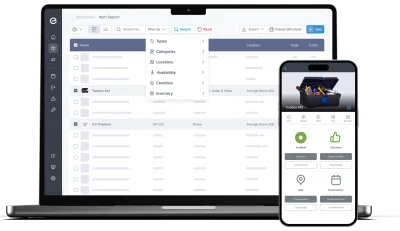
Do the planning and scheduling in our web app on any device, and checkouts and other in-field operations with our mobile app.

Key features:

  • Track all your equipment and machinery
  • Bundle toolbox contents into kits
  • Plan equipment usage
  • Schedule maintenance
  • Keep track of usage
  • Manage and resolve issues
  • Track maintenance events
01

Full control of your equipment

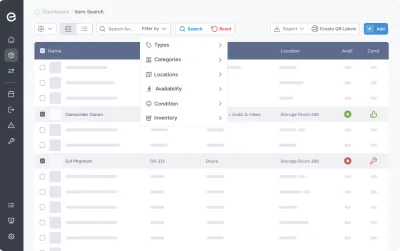
Store power tools, heavy machinery, vehicles and more in one, central database - always available and never out of sync.

  • All equipment, machines, assets and inventory in one central database
  • Categorize by type, location, specifications or other custom filtering options
  • Combine toolboxes, containers etc. with equipment into kits, that can be reserved and checked out together, but maintained separately
Items registry in Itefy with tabs, search and filters
02

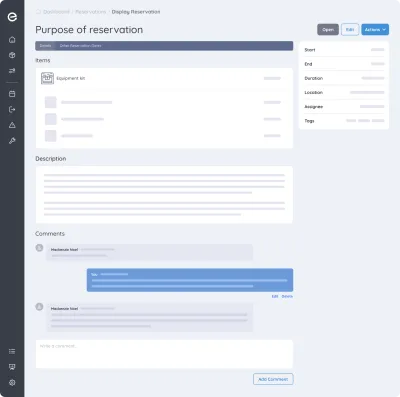
Schedule Construction Equipment Usage with Reservations

Get the most out of your machines, power tools and assets without double bookings.

  • Enable self-service bookings for workers
  • Book multiple equipment items and kits into one reservation
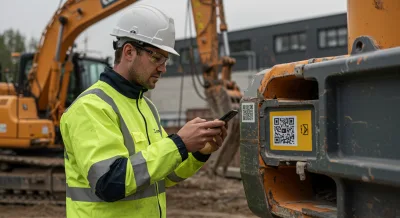
  • Scan to reserve : Use QR codes on equipment to quickly create reservations
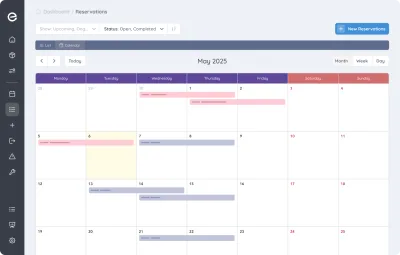
  • Get a quick overview of all upcoming reservations
Reservation calendar in Itefy with color-coded bookings
03

Track actual usage with checkouts

While reservations is for planned usage, checkouts tracks the actual utilization of your equipment.

  • Keep track of how, when and in what projects tools, machinery and other assets is being used
  • Enable self-checkout and keep track of who is in possession of the equipment
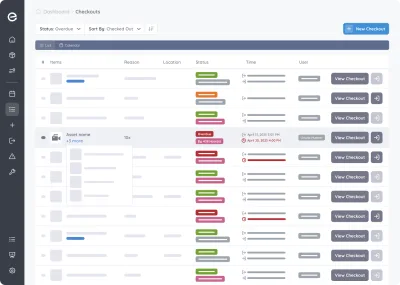
  • Be notified when equipment is not returned in time
  • Set the home location of each equipment item to easily know where it should be returned
Checkout log in Itefy with statuses and due dates
04

Scan Equipment QR codes for quick handling

Save time and avoid picking the wrong equipment - Label equipment with self-printed Itefy QR labels.

  • Print on to Avery and Herma labels with your own laser printer
  • Export item lists with unique item codes to use with dedicated label printers
  • Use our Itefy GO mobile app to scan equipment QR labels, to quickly find items, create reservations, checkouts etc.
QR label generation in Itefy
05

Maintenance Scheduling and Tracking

Reduce downtime by scheduling maintenance of each equipment item. Keep a full track record of all performed maintenance.

  • Create recurring reservations for maintenance appointments
  • Assign maintenance to the right people, and to the correct location
  • Track actual maintenance by converting reservations to maintenance events, documenting what has been done and when.
  • Enable your team to add valuable information about the maintenance progress and result
Issue ticket in Itefy with a Schedule repair action
06

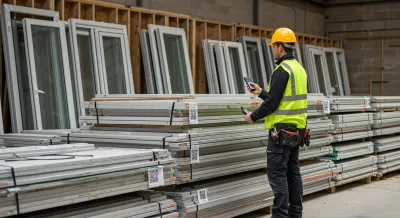
Gain full material usage control with inventory management

Never run out of building materials - keep track of usage and get notified when levels are getting low

  • Enable self-service on material usage registration
  • Label material stacks with QR code labels for quick registrations
  • Full inventory usage history
  • Be notified before empty - custom thresholds for each material stack
Inventory tab in Itefy with quantities and thresholds
07

Quick Status on the Dashboard

Get to know the overall status of your equipment in a glimpse.

  • Easy to understand, color coded boxes for vital information
  • See what needs your attention in a few seconds
  • Get statistics and the latest activity on one page
  • Shortcuts to all relevant functions
Itefy dashboard with live equipment status
08

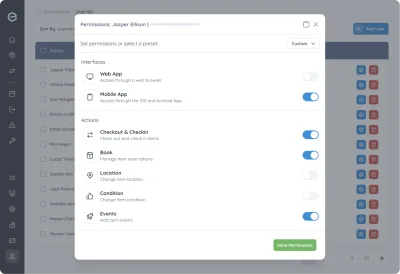
Delegate Responsibility with your Team

Take full advantage of a central, always available equipment management system like Itefy - Give you team access to self-service and distributed responsibility.

  • Set individual permission for each user
  • Assign responsibility for different equipment to different people
  • Track who is actually in possession of each equipment item
  • Create usage reports and group by people
User permissions setup in Itefy

A toolbox for all your equipment assets

Asset Database

Keep track of, organize and categorize all your assets in one database.

Learn more

Reservations

Plan and schedule usage, maintenance or whatever needs to be scheduled for your assets.

Learn more

Checkouts

Keep track of actual asset usage, and make sure it's being returned in time.

Learn more

Location Tracking

Keep track of where your assets are located at any given time.

Learn more

Issue Tracking

When equipment breaks, Itefy's issue management module helps to efficiently resolve it.

Learn more

Event Tracking

Keep track of events such as purchases, license renewals, maintenance etc.

Learn more

Mobile App

Use our mobile app Itefy GO to create reservations, checkouts and more on the go.

Learn more

Statistics

Get live statistics on utilization, performance, condition, inventory etc.

Learn more

Collaboration

Share the equipment management by delegating responsibility to multiple people.

Plans & Pricing

  • USD
  • EUR
  • NOK
Monthly Yearly
  • Basic

    N/A
    per month, paid N/A
    • N/A items
    • N/A users included
    • Extra seats N/A/month
    • N/A GB storage
    • All core features
    • Recurring reservations
    • Contacts
    • Kits
    • Reports & insights
    • API access
    Start free trial
  • Business

    N/A
    per month, paid N/A
    • N/A items
    • N/A users included
    • Extra seats N/A/month
    • N/A GB storage
    • All core features
    • Recurring reservations
    • Contacts
    • Kits
    • Reports & insights
    • API access
    Start free trial
  • Enterprise

    N/A
    per month, paid N/A
    • N/A items
    • N/A users included
    • Extra seats N/A/month
    • N/A GB storage
    • All core features
    • Recurring reservations
    • Contacts
    • Kits
    • Reports & insights
    • API access
    Start free trial

Take control of your equipment

Try every feature free for 14 days. No credit card, no obligations.