
Issued, not lent: keeping track of equipment that has no return date
A laptop for a new starter or a meter that lives on one site is not a loan. Treat it like one and it either fills your overdue list with noise or drops off the records altogether. Here is how to record issued equipment, and how to notice when some of it has quietly gone.

The short version
- Lent equipment comes back on a date. Issued equipment has no date, and forcing one onto it breaks your overdue list.
- Record issued equipment as custody, with a named holder, a start date and no return date. It is never overdue and nobody else can book it.
- A return date does two jobs. It says when, and it makes somebody look. Without it, you need another reason to look.
- Ask holders every few months to confirm, item by item, that they still have each thing. A scan is better evidence than a click.
- When an item is reported missing, change nothing automatically. Flag it and let a person find out where it went.
In this article
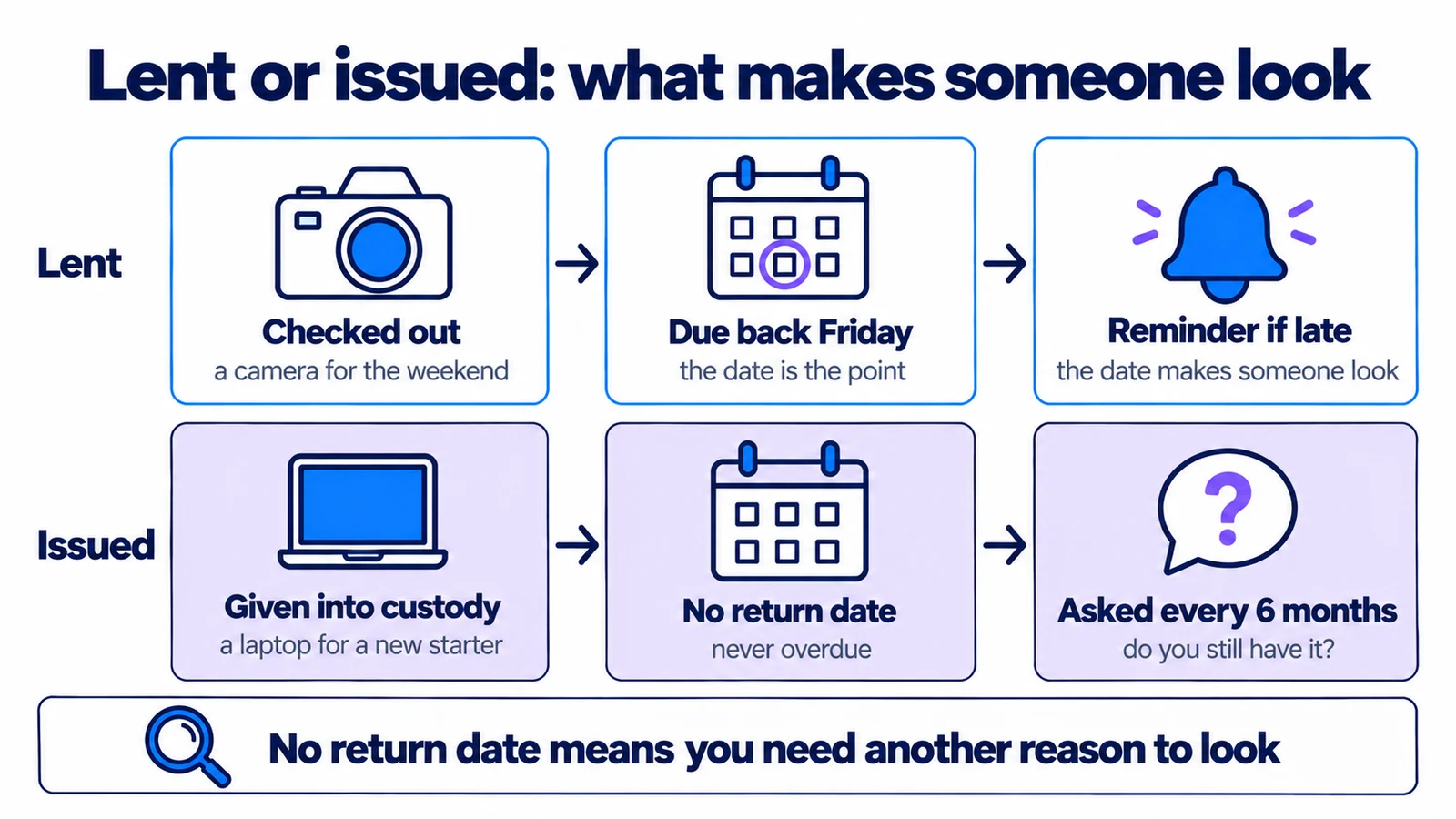
- Lent and issued are different promises
- Three ways issued equipment goes wrong
- What a custody record should do
- Replace the due date with a question
- When an item is reported missing
- How often to ask
- When someone leaves
- What custody does not do
- Where to start
The laptop was handed over on Ingrid's first day, in March. The checkout form wanted a return date, so whoever did it typed 31 December. It was the end of the year, and something had to go in the box.
In January the reminders started. Ingrid ignored them, because she was not giving the laptop back. So did her manager. By February nobody read the overdue list any more, which was a pity, because two of the cameras on it really were late.
That is what happens when equipment that was issued is recorded as if it was lent. The system keeps asking the one question that does not apply, and the noise spreads to everything else.
The short version: lent equipment goes out and comes back, and the return date is the point of the record. Issued equipment (a laptop for an employee, a meter that lives on one site, a phone that belongs to a role) has no return date. Record it as custody: a named holder, a start date and no due date, so it is never overdue and nobody else can book it. Then replace the reminder you no longer have with a question asked every few months: do you still have it?
Lent and issued are different promises
| Lent | Issued | |
|---|---|---|
| Example | A camera for Saturday's shoot | A laptop for a new employee |
| Ends | When it comes back | When the role changes, or the person leaves |
| Return date | The point of the record | Does not exist |
| Typical failure | It comes back late | Nobody notices it has gone |
| What makes someone look | The due date | A question, every few months |
The last row is the one that matters. A return date does two jobs. It says when the item is due, and it makes somebody look when that day comes. Take the date away and the reason to look goes with it.
Three ways issued equipment goes wrong
The invented date. The form insists on a return date, so somebody makes one up: the end of the year, the end of the contract, or 2099. A near date goes overdue and starts the noise from the opening. A far date never does, so it stays a small untruth that nobody reads.
Left off the system. Issued equipment does not fit the checkout form, so it ends up in an HR spreadsheet, in an email to IT, or nowhere. The register then shows the laptop as available, and somebody tries to book it. When the person leaves, the list of what to collect is put together from memory.
No date, and no question. Some systems let you leave the date blank. That fixes the noise, but nothing ever asks anyone to look again. Two years later the record still says Tomas has the multimeter. Tomas moved to the Bergen office last spring, and the multimeter is somewhere between there and a van.
What a custody record should do
Custody is a checkout with the return date switched off. Everything else about a checkout still applies: it names the holder, it records when it started, and it ends with a check-in. A few rules change:
- It is never overdue. No due-date reminders, and it never appears on the overdue list. That list goes back to meaning "late".
- Nobody else can book it. The item is with somebody, so a reservation for it is refused rather than quietly promised.
- It can end in parts. Someone changing roles may keep the laptop and hand back the monitor. Releasing custody is an ordinary check-in, so you can return some items and keep the rest.
- It converts both ways. A short loan that turns into "just keep it" becomes custody when you remove the return date. Custody that turns out to end on a known date becomes a loan when you set one.
- It is reported separately. A laptop that is always out reads as 100% in use and drags every utilisation average up. In Itefy's reports, a Checkout kind grouping keeps custody and loans apart.
In Itefy, you give custody from the normal checkout window by ticking No return date (custody):
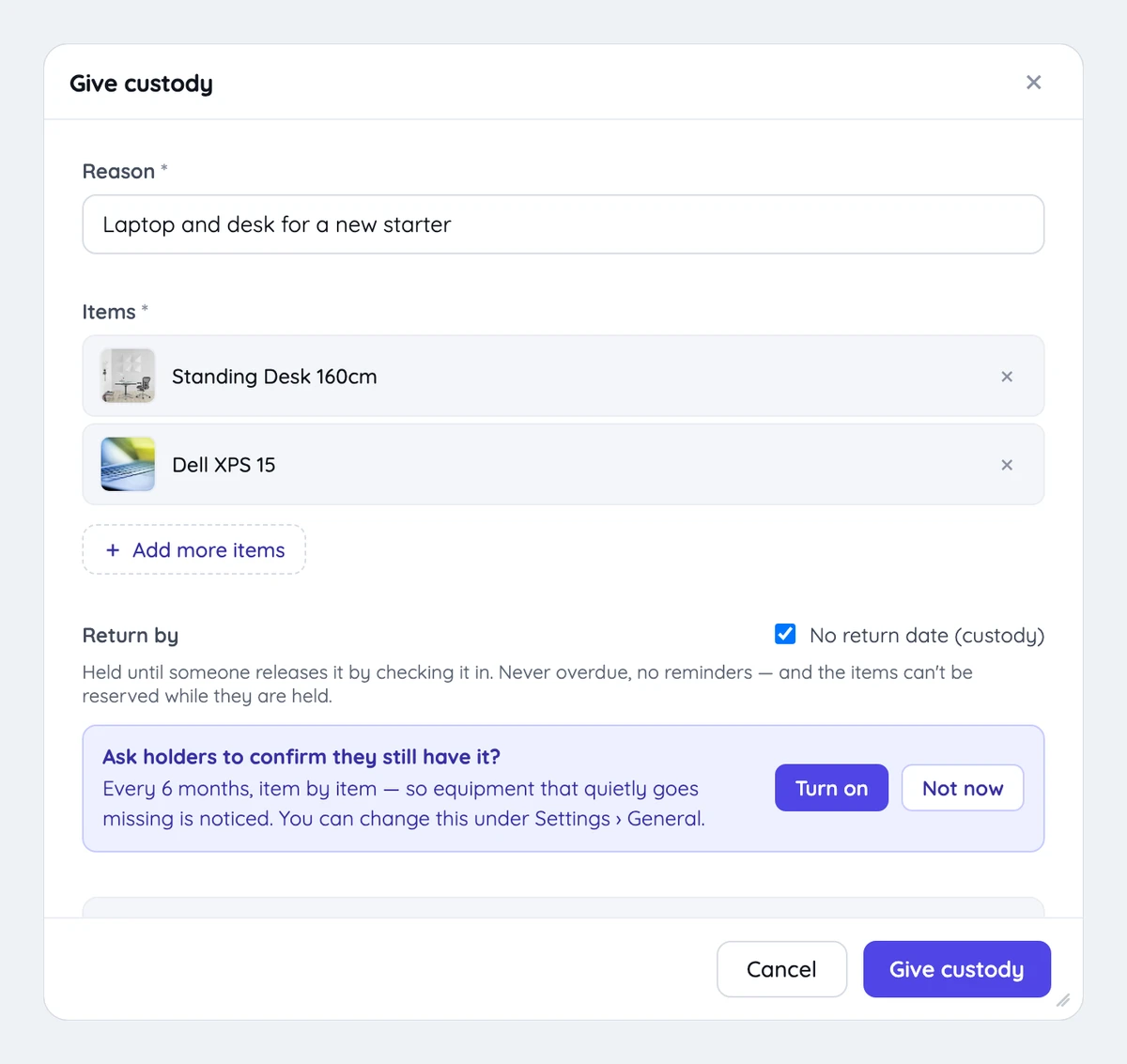
If any of the items have bookings coming up, the window lists them and asks you to tick that you understand those bookings will not be fulfilled while the custody lasts. It warns rather than refuses, because otherwise an item with any future booking at all could never be handed out.
Replace the due date with a question
The fix for the third failure is to put back the reason to look. Every few months, each holder is asked one question about each thing they hold: do you still have it?
Three details decide whether this works or becomes one more email people ignore.
One answer per item, not per person. "Yes, I have everything" hides the one thing you are trying to catch, which is the partial answer: the laptop is here, the tablet is not. So each item gets its own answer, and anything missing gets a note.
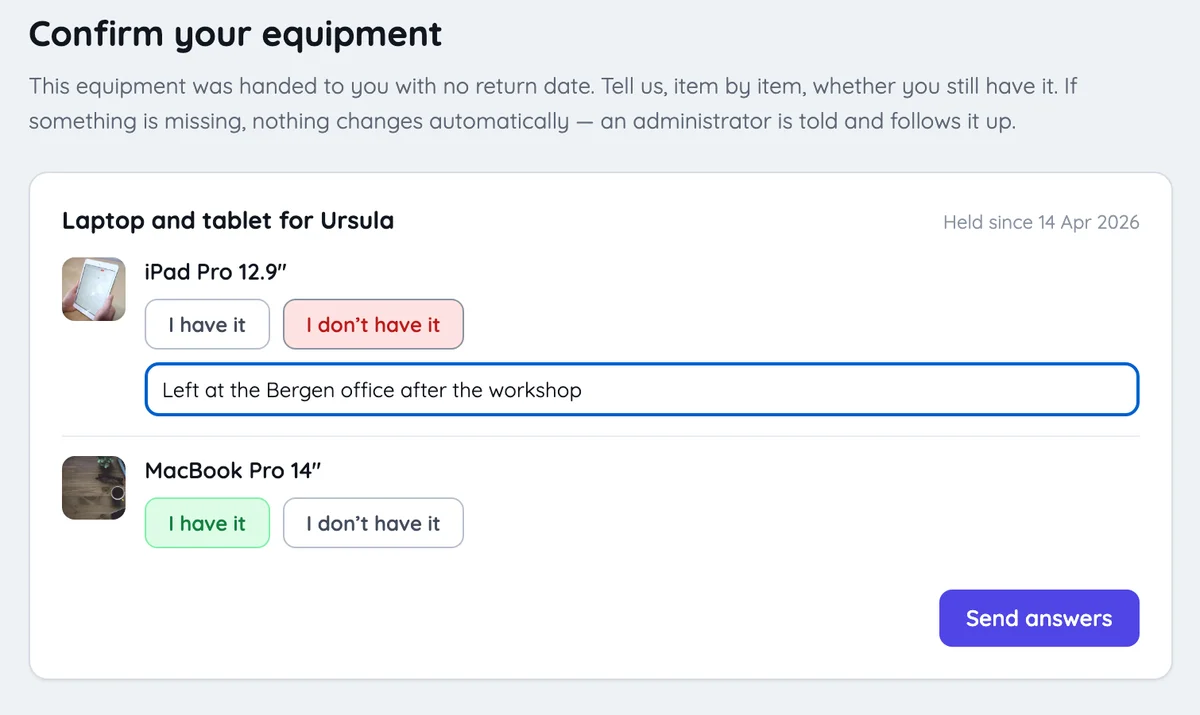
One message per person. Someone holding a laptop, a phone and a headset on three separate checkouts gets one email, not three. In Itefy they also get a notification and, in the Itefy Go phone app, a push message. They answer everything on one page.
More than one way to answer, and a record of which. A click says "I believe I have it". Scanning the item's QR code in Itefy Go says the item was in front of them when they answered. A colleague can also confirm on someone's behalf ("I've seen the defibrillator on the wall") when the holder is away. Itefy records which it was, so the history tells you how much weight each answer can carry.
When an item is reported missing
This is where a system is tempted to be helpful, and should not be. An item reported missing is not checked in automatically. It may be with a colleague, in a van or at another office. Checking it in would mark it available on a shelf where it is not, and the next person to book it would find that out the hard way.
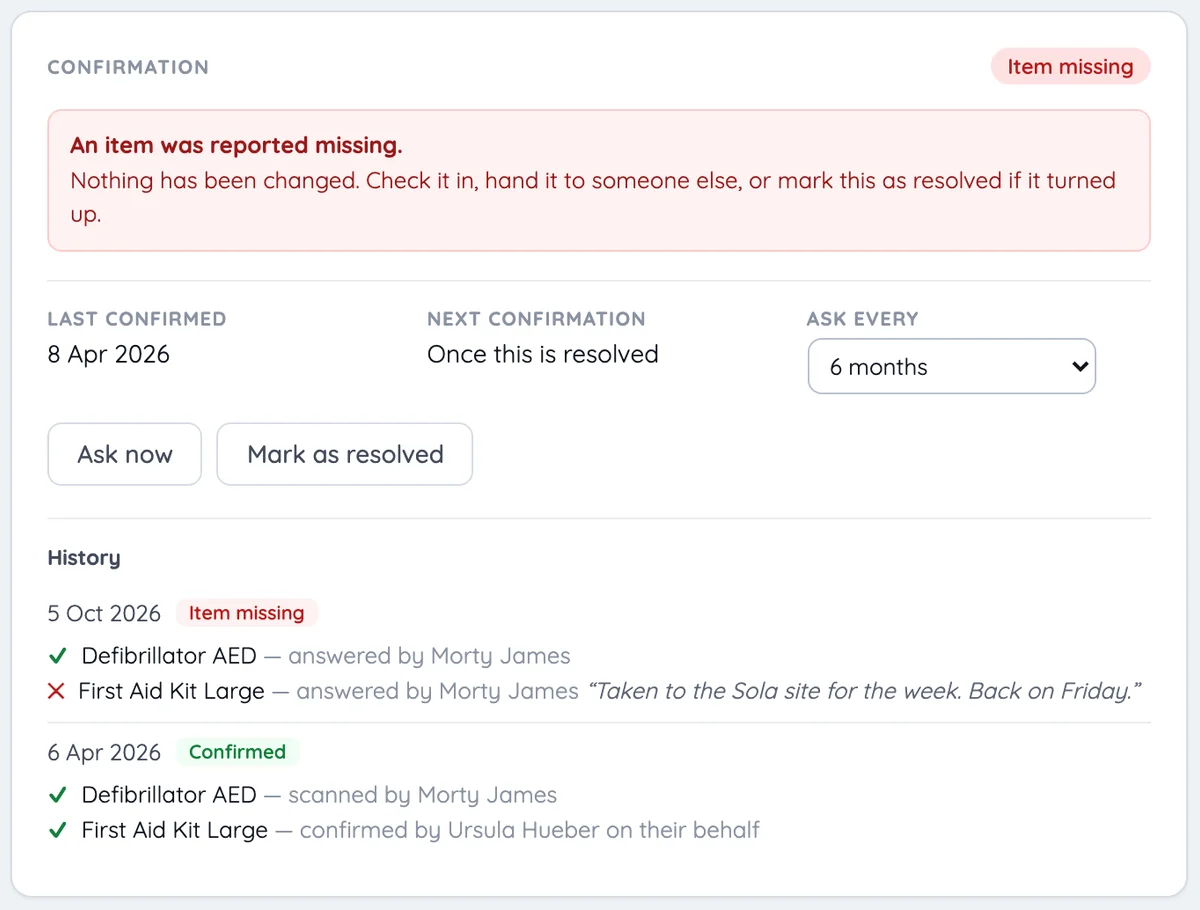
So nothing changes. The custody is marked Item missing, the administrators are told, and a person finds out what happened. Then they do one of three things: check it in if it came back, hand it to whoever actually has it by changing the holder, or mark the flag as resolved if it turned up where it should be.
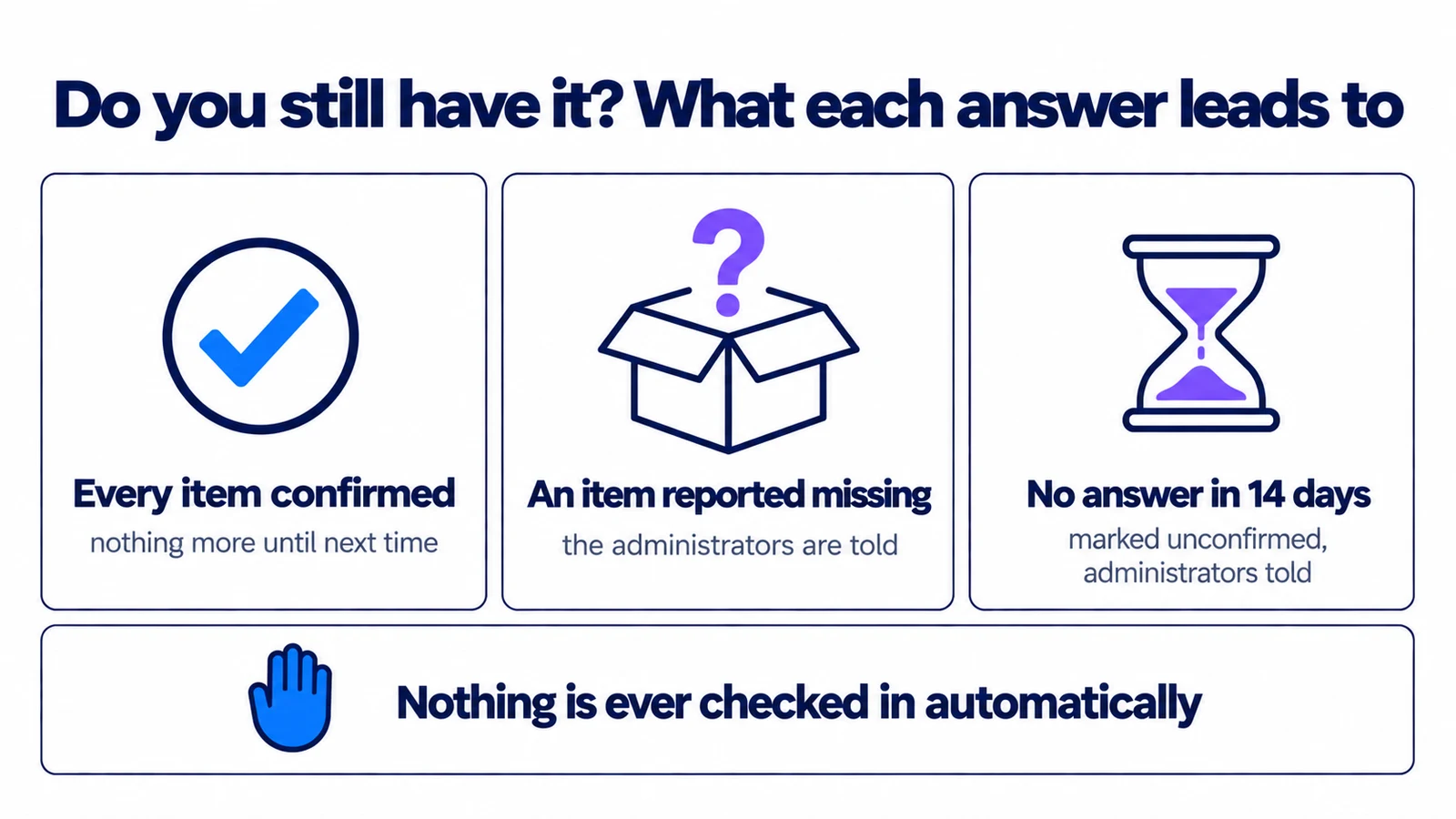
Silence gets the same treatment. A holder who does not answer gets one reminder after a week. After two weeks the custody is marked Unconfirmed and the administrators are told. No more email goes out after that until somebody acts, because asking the holder again would only bury a flag that is waiting on a person.
How often to ask
There is no correct interval, only a trade between how quickly you would notice and how often you interrupt people. A rough guide:
- Every 3 months for equipment that moves between sites or between people, or that you would have to replace quickly if it went.
- Every 6 months for most issued equipment. This is where most teams should start.
- Once a year for laptops and phones that IT handles regularly anyway, ideally timed with your year-end count.
Confirmation is off until an administrator turns it on. The interval is set for the whole account and can be changed on a single checkout, so the meter that travels can be asked more often than the desk that never moves. Before an audit, or at the end of the year, you can ask every holder at once.
One thing confirmation is not: an inspection. It tells you where something is, not whether it works. A defibrillator on the wall still needs its own maintenance schedule.
When someone leaves
Issued equipment is most likely to go missing in the week someone leaves. Their list of things to hand back is their custody list, which is why it needs to be right before that week arrives.
When you remove someone from the account, Itefy first shows what they hold in custody. Removing them does not release it. The equipment stays registered to them, is marked Unconfirmed straight away, and the administrators are told, so it gets chased while people still remember who had it. For the rest of the routine, from the first day to the last, see our guide to employee equipment tracking.
What custody does not do
To be clear about the limits:
- It is not device management. Itefy does not locate a laptop, lock it or wipe it. A confirmation is a person's answer, or a scan.
- Contacts cannot be asked. Custody can be held by a contact, such as a contractor or a customer, but contacts cannot sign in, so they cannot confirm. The checkout says so, and someone on your side has to check.
- It is not for loans. If something really does come back on a date, give it one. For a loan, the reminder is the whole value.
Where to start
If you already track checkouts, your issued equipment is probably in there with an invented date. Three steps:
- Find the invented dates. Start with the overdue list. Anything that has been overdue for months without anyone chasing it is probably issued, not late. Then look for return dates at the end of a year, or years away. Open each one, click Edit and use Remove return date to make it custody.
- Turn on confirmation, every six months to begin with, under Settings › General › Custody confirmation.
- Ask everyone once, now. The first round gives you a baseline, and it is the round most likely to find something.
None of this is about checking up on people. A list that has been confirmed twice a year protects the person holding the equipment as much as the company: it is the record of what they were given, and of when they gave it back. The full details are in the help centre under Custody.
If issued equipment is one part of a job you've just taken on, how to manage company equipment, step by step covers the rest of it in order.
Frequently Asked Questions
-
Custody is a checkout with no return date. It records who holds an item and since when, for equipment that is issued rather than lent, such as a laptop for an employee or a meter that stays at one site. The item is never overdue, and nobody else can book it or check it out until the custody is released.
-
It is the usual workaround, and it causes two problems. When the date passes, the item shows as overdue and the reminders begin, which teaches everyone to ignore the overdue list. Until it passes, the date says something that is not true. A record with no return date says what you actually know.
-
Every six months suits most teams. Ask more often for equipment that moves between sites or that you would need to replace quickly, and once a year for laptops and phones that IT sees regularly anyway. Answering takes a minute when it covers a few items, so asking costs little.
-
It should stay registered to them until it has been returned, so it can be chased while people still remember who had it. In Itefy, removing a user shows what they hold in custody before you confirm, then marks those items as unconfirmed and tells the administrators.