
The Four Systems Every Small Business Runs On (and the One Nobody Builds)
Every business runs on four operating systems: money, people, customers and things. Three of them get proper tools within a couple of years, because something outside the business forces the issue. The fourth one has no forcing function, so it stays in somebody's head. Here is how to build it, in a week, starting with a list.
The short version
- Every business runs four systems: money, people, customers and things. The first three get software because a tax deadline, a payroll run or a lost lead forces the issue. Nothing forces the fourth.
- Procedures fail when the things they refer to don't exist as records. "Check the van out before you take it" needs a list of vans. Build the register first, then write the procedure. Nouns before verbs.
- A record that requires a separate act of discipline after the real work will be at its most wrong exactly when you are busiest. The only durable version updates itself as a by-product of doing the job.
- Sort what you own into three states: assigned to one person, shared in turns, or fixed in place. They ask three different questions and need three different procedures. Most of the mess comes from treating them alike.
- Under about 20–30 items in one location with one person maintaining it, a spreadsheet is genuinely the right answer. Don't buy anything until you can name which of the five breaking points you've hit.
In this article
- The four systems every business runs on
- Nothing ever forces you to build the fourth
- Build the register before you write procedures
- Four levels of record-keeping, from memory to self-updating
- Twelve questions to find your weakest system
- How to build the fourth system in about a week
- Do you actually need software for this?
- You're buying the end of a category of questions
Nothing in your business is on fire.
Invoices go out. People get paid on time. Customers get answered. If somebody asked whether you run a tidy operation, you would say yes, and you would be broadly right.
And then, every few weeks, something happens that shouldn't.
The projector isn't in the storeroom, twenty minutes before a client presentation. Two people have promised the van to different jobs on the same Thursday. Nobody can say whether the new developer was issued a laptop or bought one and expensed it. A machine fails an inspection because its service was due in March, and the reminder lived in the calendar of somebody who left in February.
None of these is a disaster. Each one costs an hour, or a small amount of money, or a little credibility with a customer. They feel like bad luck, or like the ordinary price of being busy.
They aren't. They are all the same thing, and it has a shape.
The four systems every business runs on
Every business — a two-person studio, a forty-person contractor, a school department, a church — runs on four operating systems.
- Money. What came in, what went out, what's owed, what it's all worth.
- People. Who works here, what they're paid, when they're off, what they've agreed to.
- Customers. Who they are, what they asked for, what you promised, what you delivered.
- Things. What you own, where it is, who has it, what condition it's in, when it was last serviced.
You have all four whether or not you have ever named them. The only question is what state each one is in.
If you have read anything about systemizing a business before, that list will look strange, because it is cut along a different line. The usual way to divide a company is by department (marketing, sales, delivery, admin) or by discipline, which is how the E-Myth franchise-prototype tradition does it. Both of those describe who does which work.
This one describes what each system is a record of. The distinction matters, because the thing that fails in a small business is rarely a department. It's a record nobody kept.
Nothing ever forces you to build the fourth
Now count the software you pay for. Almost every business past its second year has a proper tool for the first three. Accounting software, bought early. Payroll or an HR system, bought somewhere around the fifth employee. A CRM, a shared inbox or a helpdesk, bought the first time a customer said "I emailed you about this three weeks ago."
And the fourth?
For most small businesses, the fourth system is a person. It's whoever has been here longest and happens to remember where things are. It's a whiteboard by the storeroom, a message thread, and a spreadsheet that one person keeps alive and everybody else has quietly stopped opening.
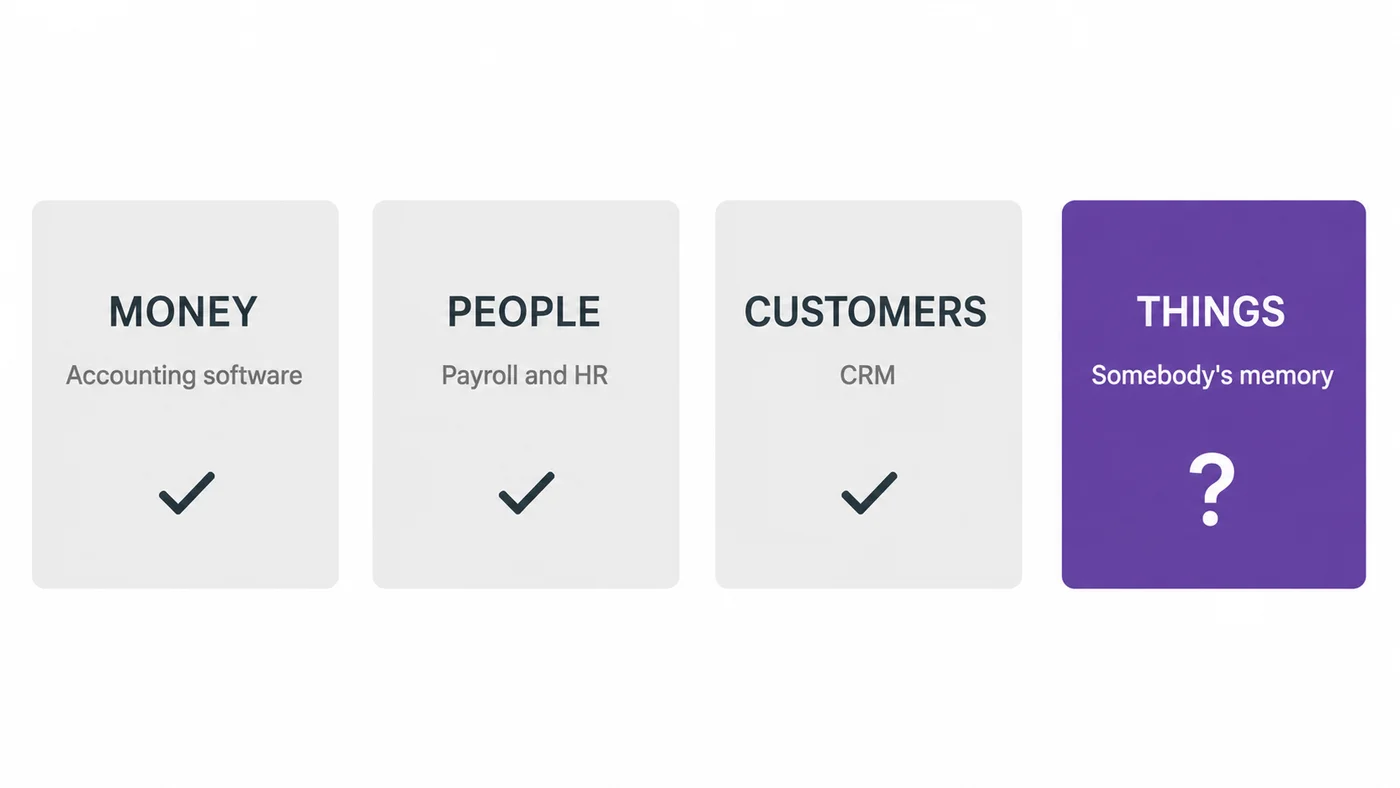
Here is the part worth sitting with: that is not a discipline failure. It is a structural one.
You didn't buy accounting software because you are an organized person. You bought it because a tax authority set a deadline and attached a penalty to it. You didn't build a people system out of diligence: payroll runs every month whether you're ready or not, and getting it wrong is the kind of wrong that people notice immediately. You bought something for customers because a lead fell through the cracks and you felt it in revenue.
Each of the first three has a forcing function: something outside the business that makes the problem undeniable, on a schedule.
The fourth has none. Nothing bounces when you lose a drill. No authority fines you for not knowing where the laptops are. No customer writes in to complain that your service intervals aren't logged. The cost of the fourth system is entirely real, but it arrives in small pieces, spread thinly across the year, and almost every piece gets filed under bad luck.
So it stays where it is, in somebody's head, for years after the other three were solved properly.
Build the register before you write procedures
Once you decide to get properly organized, the standard advice is to write down how things are done. Document your processes. Write your SOPs. Build an operations manual so the business doesn't live in three people's memories.
It is good advice and it usually fails, for a reason that has nothing to do with discipline. Once you see it you can't unsee it.
A procedure is only executable if the things it refers to already exist as records.
- "Check the van out before you take it" assumes there is a list of vans, and somewhere to record who took one.
- "Service the compressor every 500 hours" assumes something counts the hours and something raises its hand at 500.
- "Return all company equipment on your last day" assumes somebody wrote down what you were issued on your first.
Write the procedure without the record and you haven't written a procedure. You've written a wish, and made it somebody's job to remember to be good.
This is why so many carefully-written process folders are dead by month three. Not because people are lazy, but because the verbs had no nouns. The document describes a world that doesn't exist yet, and every attempt to follow it runs into the same wall.
So do it the other way round. Nouns before verbs: build the register first, then write the short procedure that keeps it true.
That order also tells you which of your four systems to work on. It's the one where you don't have the nouns.
Four levels of record-keeping, from memory to self-updating
"Organized" and "disorganized" are useless as grades. Here is a better scale. Any of the four systems sits at one of four levels.
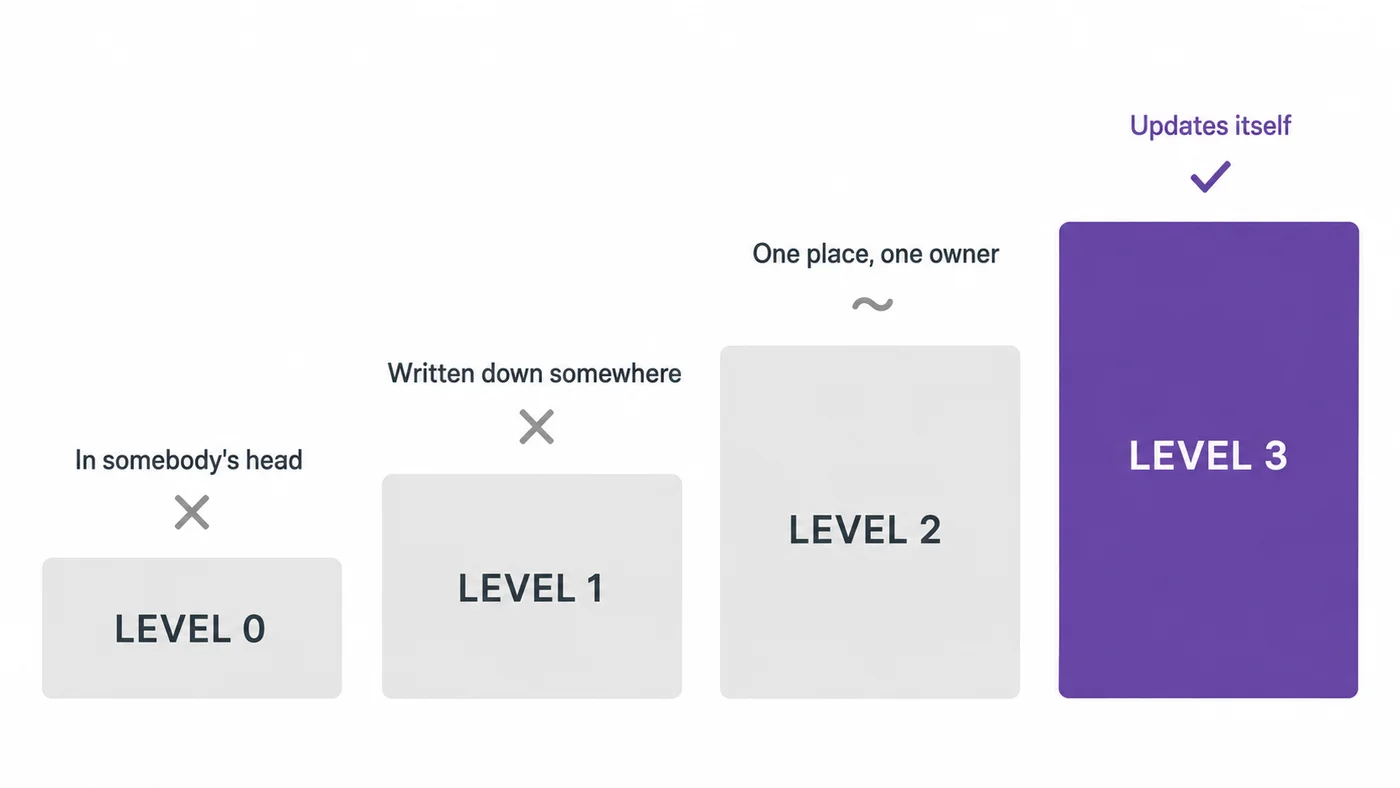
Most advice about getting organized is really advice about moving from 0 to 1. Write it down. Make a list. Start a spreadsheet. That is genuine progress, and it is nowhere near enough, because Level 1 and Level 2 both depend on a separate act of discipline after the real work is finished.
You take the drill. Then, later, if you remember, and if you have a hand free, and if you aren't already late for the job — you go and record that you took the drill.
Under pressure, that second step is always the one that gets dropped. Which means your record is at its most wrong exactly when the business is busiest, which is exactly when you need it to be right. A Level 1 system doesn't fail gradually; it fails on your worst week.
Level 3 is different in kind, not in degree. At Level 3 there is no second step. The act of taking the drill is the act of recording it, because taking it involved scanning it, or booking it, or signing it out, and that was the fastest available way to do the thing you were already doing.
Look at your other three systems and you'll notice they all made this jump, quietly, over the last fifteen years. Money reached Level 3 when bank feeds arrived and you stopped typing transactions in from a paper statement. People reached it when staff started booking their own leave in the system instead of asking you and hoping you'd remember. Customers reached it when the enquiry form started creating the record itself.
Things, for most small businesses, is still sitting at Level 0 or 1. It is also the only one of the four where the people generating the events aren't sitting at a computer when they generate them.
Twelve questions to find your weakest system
Here is the fastest way to find out where you actually stand. Twelve questions. The rule is that you have to answer each one in about ten seconds, from where you are sitting, without asking anybody.
Money
- What did you turn over last month?
- Who owes you money right now, and how much?
- What is your largest recurring cost?
People
- Who is off next week?
- When did each person last have a proper conversation about how it's going?
- Where is the signed contract for your most recent hire?
Customers
- How many open enquiries do you have?
- What did you promise your largest customer, and by when?
- Who spoke to them last?
Things
- Where is every laptop, phone, vehicle and set of keys the business owns, right now?
- Who has the last thing that went missing, and when did they take it?
- What is due for service, inspection, calibration or renewal in the next thirty days?
Most people who take this honestly find the same shape. Comfortable on 1–9. Unable to answer 10, 11 and 12 without standing up, opening something, or texting somebody.
If that's you, you are entirely normal. You are also carrying a cost you have never measured, because the things you can't answer questions about are exactly the things that get bought twice, walk out of the building, and fail on the one day you needed them.
How to build the fourth system in about a week
None of what follows requires buying anything. Do it with a notebook if you like. The steps are the system.
If you're not the owner but the person who has been handed this job, our step-by-step guide to managing company equipment covers the same ground from your side, starting with what to agree with your manager.
1. Walk the building and run the insurance test
Don't try to inventory everything. Take a slow lap of the premises, including the vans and the back of the storeroom, and ask one question of everything you see: if this vanished tonight, would I have to replace it?
Set a value floor to keep it sane, then override it for anything that is shared, borrowable or losable. A $40 torque wrench that three people need is a bigger operational problem than a $900 desk that has never moved.
You want a list, not a database. Forty lines is a perfectly good first afternoon. There's more detail on doing this properly in our guide to building an asset register, but the first pass should be fast and rough.
2. Give every item one home
For each item, answer: where does this live when nobody is using it?
This single question does more work than it looks like it should. Most "lost" equipment is not lost. It is in a place that was never wrong, because no place was ever right. Once every item has one home, "put it back" becomes a real instruction instead of a general appeal for tidiness. "It's not where it should be" turns from a shrug into information.
3. Sort everything into assigned, shared or fixed
This is the step people skip, and it is the one that makes everything after it simple. Everything you own is in one of three relationships with your team.
| State | What it looks like | The question you'll need to answer |
|---|---|---|
| Assigned | One person, indefinitely: a laptop, a phone, a set of keys | Who has it? The moments that matter are the first day and the last day |
| Shared | Many people, in turns: a van, a projector, a camera, a meeting room | When can I have it? The failure mode is two people needing it at once |
| Fixed | Stays put, used in place: a compressor, a printer, a lathe | Does it work, and when was it last serviced? |
Three states, three different questions, three different procedures. Nearly every mess in the fourth system comes from treating all three the same way, usually by putting them in one flat spreadsheet that answers none of the three questions well.
4. Put a label on every item
A printed QR code taped to the case is enough. So is a numbered sticker, if the numbers mean something.
The point isn't the technology. The label is the join between the physical object and the record: it means anybody holding the thing can get to its record without knowing what it's called, what it cost, or where it was filed. Without that join, your register is a document about equipment. With it, the register is reachable from the equipment itself, which is where people actually are when they have a question about it.
5. Write the four procedures, and stop there
The register exists, so the verbs finally have nouns. Four short paragraphs:
- Taking something. What happens before it leaves the shelf.
- Bringing it back. Where it goes, and what you say if it came back different from how it left.
- Something's broken. Who to tell, how, and what happens next.
- Joining and leaving. What someone is issued on day one, and what comes back on the last.
Not a manual. If any of the four takes more than a paragraph, the register isn't carrying enough of the weight yet.
That last one deserves a moment on its own. The leaving day is where the fourth system gets audited whether you like it or not, and it is the single most common place where small businesses discover the register they never built. A sign-out sheet on day one is what makes the last day take five minutes instead of five emails.
6. Decide where the record lives
Which brings us to the only question in this article that costs money.
Do you actually need software for this?
Often, no. A spreadsheet is genuinely the right answer when all of these are true:
- roughly twenty to thirty items, or fewer
- one location
- one person maintains it, and that person sits at a desk
- nothing needs to be reserved in advance
- nobody needs the record while standing in a storeroom with their hands full
If that describes you, don't buy anything. Take our free equipment tracking spreadsheet, fill it in, and get on with your work. It will hold for a couple of years.
It stops holding at fairly predictable points, and it is worth knowing them in advance so you can recognize the moment rather than absorbing the pain for another eighteen months.
| What changes | What breaks |
|---|---|
| A second person needs to write to it | Two versions of the truth, both partly wrong, and no way to tell which is which |
| The people using the gear aren't at desks | The record gets updated hours later, from memory, or not at all |
| Things start being needed at a future time | A spreadsheet can record a conflict; it can't refuse one |
| Something needs to remind you | Nothing does. Service dates, inspections and renewals pass in silence |
| You need to know what was true last March | A spreadsheet shows you the present. It overwrote the past |
That last row is the one people underestimate most. Insurance claims, warranty disputes, audits and the question "who had this when it broke?" are all questions about history, and a cell that gets edited in place has no history to give you.
Where Itefy comes in (and where it doesn't)
We make Itefy, an equipment management system for teams that share gear. It holds the register, handles checkouts and returns, reservations with conflicts caught at booking time, and maintenance schedules with reminders. It also keeps a full history for every item, so last March is still there. You print QR labels yourself and scan them with any phone; there's no special hardware to buy. It starts at $15 a month, and the trial is fourteen days with no card.
But we would genuinely rather you read the six steps above and do them in a spreadsheet than buy something you don't need yet. The steps are the system. The software only changes where the record lives: from a place that depends on somebody remembering, to a place that updates itself because updating it was the fastest way to get the drill.
That distinction matters enormously at forty items and three people. It matters not at all at twelve items and one. And when it does start to matter, don't take our word for whose software to buy. We counted what 2,151 buying-thread comments actually recommend, so you can see the whole field before you shortlist anything.
You're buying the end of a category of questions
None of this is really about tidiness. A tidy storeroom is a by-product, and a fragile one: it survives until the second week of a busy month.
What you are actually buying is the disappearance of a whole category of question. Where's the…? Who's got the…? Did anyone book the…? When was that last serviced? Each one is thirty seconds of somebody's attention, several times a day, forever. And every so often one of them stops being thirty seconds and turns into a missed job, a failed inspection, or a thing you buy for the second time.
Three of your four systems stopped generating those questions years ago. You solved them because something outside the business made you.
Nothing is ever going to make you solve the fourth one. That is the only reason it's still open.
Frequently Asked Questions
-
Four, whatever the trade: money (what came in, what went out, what's owed), people (who works here, what they're paid, when they're off), customers (who they are, what you promised) and things (what you own, where it is, who has it, when it was last serviced). You already have all four in some form. The only question is whether each one lives in a system or in somebody's memory.
-
Usually because the records they depend on don't exist. A procedure is only executable if the things it refers to are written down somewhere first. "Return all company equipment on your last day" assumes somebody recorded what was issued on the first day. Write the procedure without the underlying register and you have written a wish. Build the register first, then the procedure that keeps it true.
-
For roughly 20–30 items in one location, maintained by one person who sits at a desk, yes, and you should not buy anything until that stops being true. It stops holding at five fairly predictable points: when a second person needs to write to it, when the people using the equipment are not at desks, when things need booking in advance, when something needs to remind you, and when you need to know what was true last March rather than what is true now.
-
Walk the building and ask one question of everything you see: if this vanished tonight, would I have to replace it? That list is the start. Then give every item one home location, sort the list into assigned, shared and fixed, put a label on each item, and write four short procedures: taking something, bringing it back, reporting it broken, and the joining and leaving handover. That is a week's work at most and it is the whole system.
-
Assigned items belong to one person indefinitely (a laptop, a phone, a set of keys); the question is who has it, and the moments that matter are the first day and the last. Shared items are used by many people in turns (a van, a projector, a meeting room); the question is when you can have it. Fixed items stay where they are and get used in place (a compressor, a printer); the question is whether they work and when they were last serviced. They need three different procedures.