
What Ten Equipment Systems Actually Mean When They Say "Kits"
Almost every equipment management tool has a checkmark next to "kits". We read the published documentation for ten of them, and the mechanics behind that checkmark differ so much that they are not the same feature at all.
In this article
- Three patterns, and the checkmark hides which one you are buying
- The clamp's structural weakness
- Nobody nests
- What happens when it comes back short
- Partial availability, and the seven-status kit
- Membership: can one item be in two kits?
- The one thing we could not verify
- How to actually evaluate this
Every feature comparison in this market has a row called "Kits", and almost every column gets a ✅. It is one of the least useful rows on the page.
We went looking for what sits behind that checkmark, because a customer once described their gear to us as "cases inside cases" and we wanted to know who else could actually store that. The answer took a fortnight of reading help centres, knowledge bases, one open-source database schema and one public API reference. The mechanics differ so much between products that calling them the same feature is close to meaningless.
Here is what we found, including the parts where other tools beat ours.
Three patterns, and the checkmark hides which one you are buying
Everything in this market reduces to one of three models.
The clamp is a fixed set of specific items that move as one. Name the exact serialised gear, and the system forces it through every transaction together. It is the right shape for a flight case or a crash cart. EZOfficeInventory's Packages are the purest example: their documentation states that "assets in a package can not be checked-in/out, individually", and the whole package transacts whenever one member does. Asset Panda's kits work the same way — "they will always be returned together as well" — as do AssetTiger's linked assets and Cheqroom's locked kits.
The template is a recipe. The kit names types and quantities, and the system
picks real instances when the booking happens. Snipe-IT's predefined kits are built
from asset models rather than specific assets. Booqable bundles let you choose "Any
variation" and defer the decision to order time. WebCheckout's Bundles are "a
predefined set of Resource Types", with instance assignment genuinely deferred —
their API reference notes that allocationItem.resource "may be null in the event
of an RRT item".
No kit at all is more common than you would expect. Sortly's own answer to a bill-of-materials question is to nest folders and print a QR code to stick on the physical case — the grouping lives on the box, not in the data. Timly has container items and genuine multi-level subcontainers, but containers are a storage hierarchy; there is no kit-booking concept.
The distinction matters more than the checkmark, because it decides what happens on a bad day rather than a good one. Templates survive contact with reality better — but you lose the guarantee that this camera goes out with this lens.
The clamp's structural weakness
Clamps have a failure mode worth understanding before you commit to one: breaking the kit is an administrative act, not a transaction.
EZOfficeInventory makes it explicit. To change what is in a Package you use Re-Assemble Package, and you can only do that with items that are "not checked out, in maintenance, or have outstanding reservations". Read that again with a repair in mind. A lens goes off for service, so you want to take it out of the package — but you cannot, because it is in maintenance. The moment reality diverges from the kit definition is exactly the moment you are blocked from fixing it.
WebCheckout avoids this by making combination and disassembly of serialised components an on-the-fly desk operation rather than an administrative one, which is a real advantage. Cheqroom sidesteps it by making the clamp optional per kit — locked kits enforce all-or-nothing, unlocked ones allow partial selection.
Nobody nests
Here is the finding that surprised us most. In ten products, not one documents a kit that can contain another kit.
Shelf.nu is open source, so this one is not inference: its Kit model has no
self-relation, which makes nested kits structurally impossible. What makes that
interesting is that Location in the very same schema does carry a self-relation
for nested locations — so it is a deliberate design decision, not an oversight.
Cheqroom, Booqable and Snipe-IT never mention nesting at all. Booqable is explicit
in the other direction: bundles are never listed as valid bundle content.
Nesting does exist in this market — but only for storage. Timly's subcontainers go as deep as you like. Sortly has subfolders. Shelf.nu nests locations. None of those are bookable.
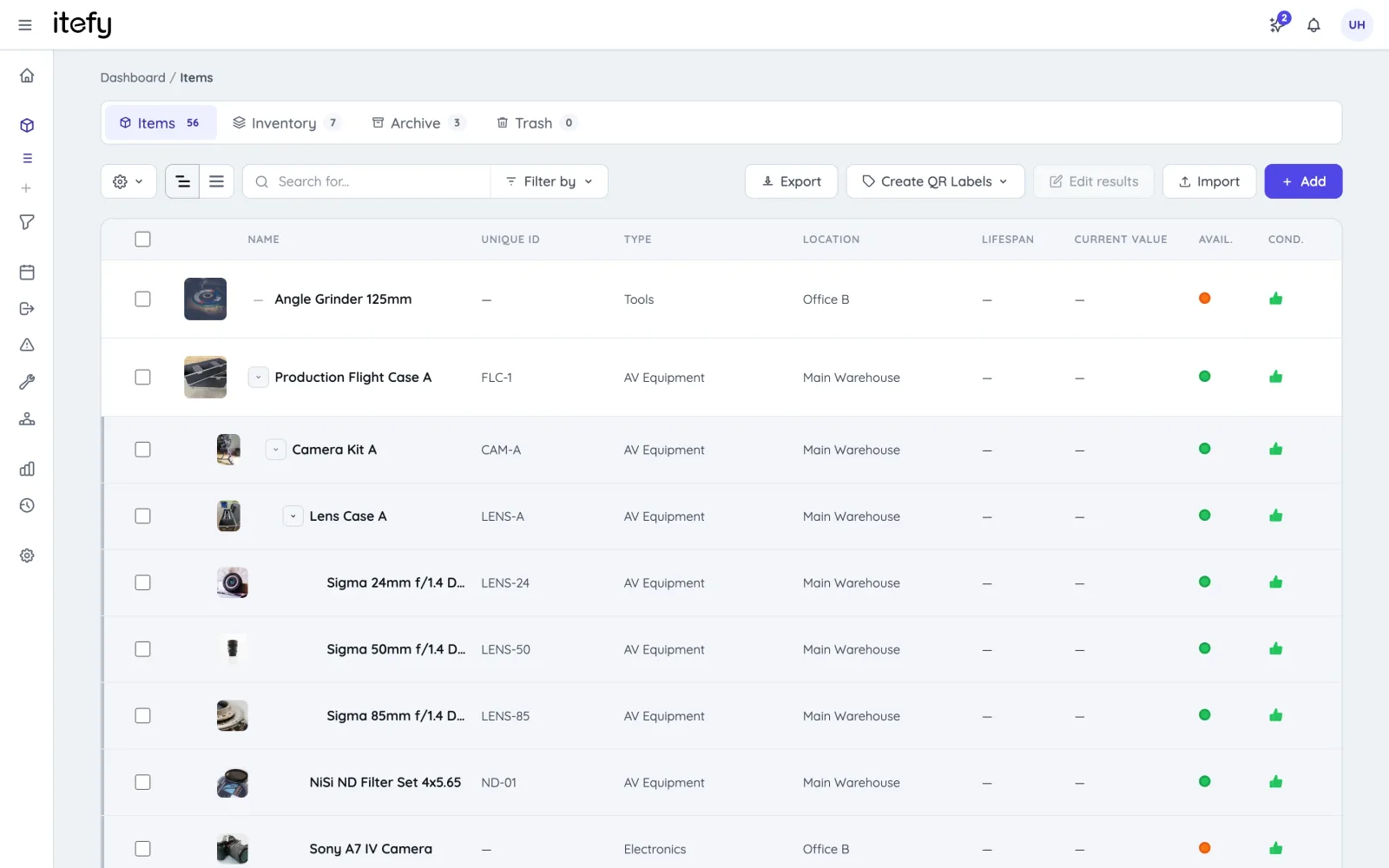
That gap is the reason we built ours the way we did. In Itefy, kits nest five levels deep, and anything can be a member and a container at the same time: the primes sit in a lens case, the lens case sits in the camera package, the package sits on the cart. Book any level and everything below it travels with it. Each level is still a real item you can service, value and scan on its own.
If your equipment genuinely is a flat list of cases, this will not matter to you at all, and you should ignore it. If you have ever tried to describe a package that contains other packages to a system that only understands one level, you already know the shape of the problem.
What happens when it comes back short
This is the axis we expected to win on, and did not.
Partial return is not the open gap it looks like. Cheqroom supports partial check-in: the checkout stays open until everything is back or you close it manually. Booqable marks orders partially returned and gives them a "Mixed" status. Itefy does item-level partial check-in too.
But only Shelf.nu makes it kit-aware. It has a workspace setting for how kits count during check-in: by default each asset counts individually, but you can switch to kit-as-a-unit counting, where "a kit only counts as checked in once every asset inside it has been returned", and missing members are flagged as they go. Nobody else does that, us included. Cheqroom's partial check-in is purely item-level — nothing says "this kit came back incomplete". And in the clamp models it is structurally impossible: EZO Packages forbid individual check-in outright.
If short returns are the thing that hurts you most, that is a real point in Shelf.nu's favour, and we would rather say so.
Partial availability, and the seven-status kit
The other place we are behind is worth naming too.
Cheqroom has seven kit statuses: Available, Checked out, Awaiting checkout, In
custody, Empty, Partially available and Retired. When a kit is partially
available you can swap in a replacement item or remove the unavailable one from the
booking. Having Empty and Partially available as first-class states is the most
sophisticated thing anyone in this market does with kits, and the contrast with
Shelf.nu's three-value kit status shows it is a genuine architectural fork rather
than a UI detail.
Itefy flags what is unavailable and lets you take the rest; we will not offer you a similar item to swap in. If substitution is central to how you work, Cheqroom and WebCheckout's Resource Types are the two mechanisms in this market that do it properly.
Membership: can one item be in two kits?
Mostly no, and the vendors that say so out loud are being helpful.
Cheqroom states it explicitly — an item belongs to one kit at a time — and its own metaphor is "a flight-case which always has the exact same contents". Shelf.nu enforces it with a database trigger for individually tracked assets, while deliberately allowing quantity-tracked stock to belong to several kits at once. That split rule is unique in this comparison.
Itefy works like Cheqroom here: one kit per item. If you need the same tripod to appear in two different packages, none of the specific-item systems will let you, and you are looking for a template-style product instead.
The one thing we could not verify
WebCheckout is conceptually the richest system here — it separates containment, accessories, type-level bundles and substitution into four distinct mechanisms, where everyone else conflates them. But the detailed articles are behind a customer login, and the old documentation wiki now 404s after a move. Nesting, partial return and kit-level availability are genuinely unknown for WebCheckout, and we are not going to claim otherwise. If you are evaluating them, ask those three questions in the demo.
How to actually evaluate this
If kits matter to your operation, the feature list will not tell you what you need to know. Five questions will:
- Is the kit specific items, or a recipe of types? Ask which one, then ask what happens when the specific item you wanted is out.
- Can a kit contain a kit? If your gear is cases inside cases, this is the question that decides everything else.
- What happens when one member is in for repair? Specifically: can you service it without dismantling the kit first?
- What happens when part of it comes back? Can you check in what returned, and does the system know the kit is incomplete?
- Can one item belong to two kits? Usually no — but find out before you model your inventory around it.
We wrote this up because we went through the exercise ourselves and found the public information genuinely poor. Kit mechanics are under-documented almost everywhere in this market, which is unfortunate given how much they shape day-to-day work once you have committed.
If you want to see how ours behaves, the kits page explains the mechanics — including the three things it deliberately does not do. Or read the honest comparisons with the tools mentioned here.
Sources: vendor help centres and knowledge bases (Cheqroom, EZOfficeInventory, Booqable, Shelf.nu, Asset Panda, Snipe-IT, Timly, Sortly, WebCheckout), the Shelf.nu open-source Prisma schema, the WebCheckout public API type reference, and first-party testing of AssetTiger. Correct as of August 2026 — vendors ship, so verify anything decisive in a trial.