
Makerspace equipment booking without the chaos
A makerspace runs on shared machines and volunteer hours — the worst possible conditions for informal equipment management. How to run booking, induction gating and maintenance for a space where nobody's job is to chase the laser cutter's logbook.
In this article
- Split the equipment into three regimes
- Gate the dangerous machines on inductions, not signs
- Make problems reportable in ten seconds
- The membership dimension
- Start smaller than you think
A makerspace is an experiment in optimism: expensive machines, shared by dozens or hundreds of members, most of whom are lovely, some of whom will absolutely leave the laser cutter's honeycomb full of burnt acrylic at 23:40. The community is the point — but the equipment is the budget, and equipment management in a makerspace has a constraint most workplaces don't: nobody's job is to manage it.
That constraint decides everything. Whatever system you run has to work unattended, from a phone, for people who visit twice a month.
Split the equipment into three regimes
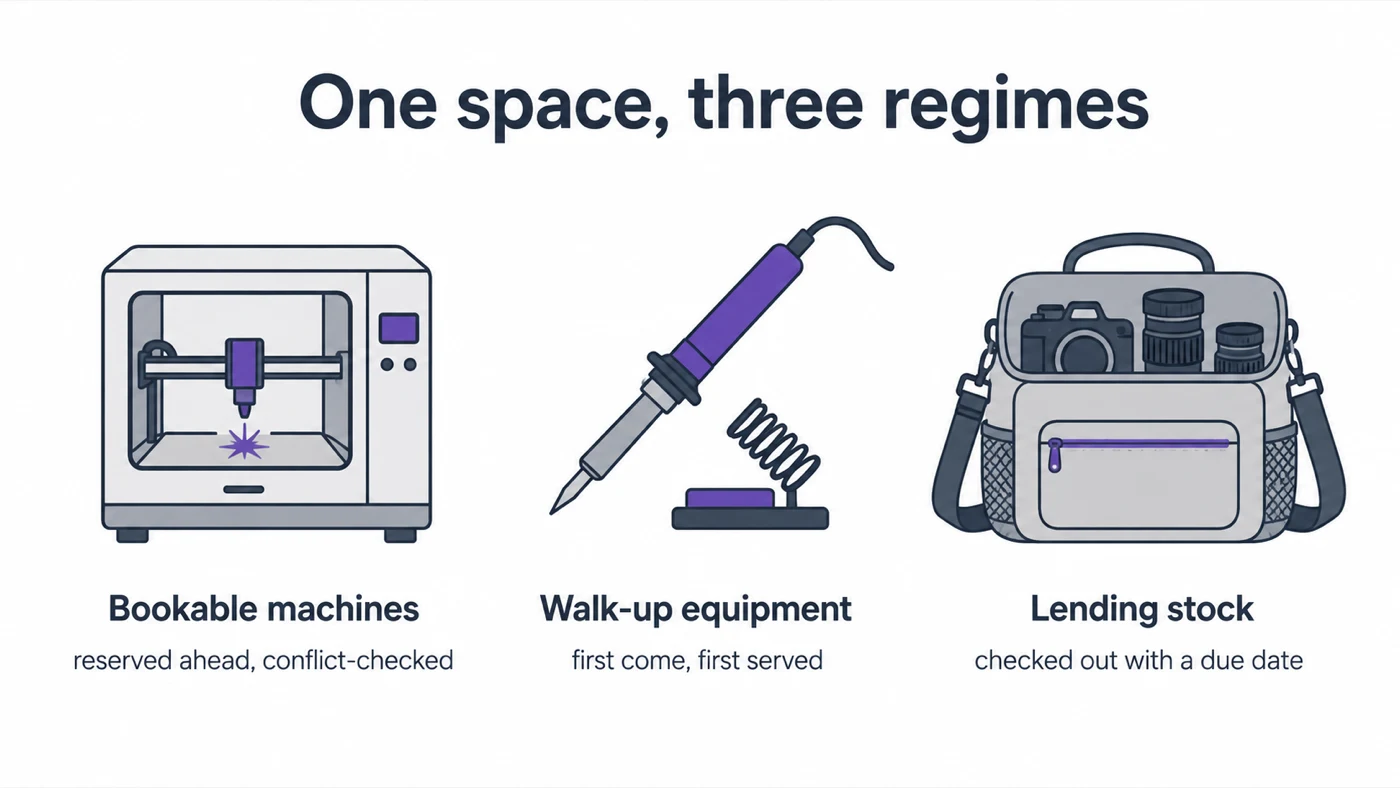
The classic mistake is one rule for everything. A space has three kinds of equipment, and they need three regimes:
- Bookable machines — the laser cutter, CNC router, embroidery machine, the good 3D printers. High demand, sessions measured in hours, conflicts genuinely painful. These get real reservations: members book a slot ahead of time, the calendar is public, and double-bookings are refused at booking time — not discovered by two members standing at one machine on a Saturday.
- Walk-up equipment — bench tools, soldering stations, sewing machines. Booking these would be bureaucracy; first-come-first-served is fine. They still belong in the register with an ID and a condition history, because they break too.
- Lending stock — the multimeters, cameras, and kits members can take home. These need a checkout with a due date, exactly like a library: scan the label, confirm, bring it back before the reminder email gets embarrassing.
Writing down which regime each item belongs to is half the policy work. It also surfaces honest conversations — if nobody has booked the vinyl cutter in a year, it's walk-up equipment pretending to be precious.
The three regimes at a glance:
| Bookable machines | Walk-up equipment | Lending stock | |
|---|---|---|---|
| Typical items | Laser cutter, CNC, good 3D printers | Bench tools, soldering, sewing | Multimeters, cameras, kits |
| Booked ahead? | Yes — conflict-checked slots | No — first come | No, but checked out |
| Leaves the space? | Never | Never | Yes, with a due date |
| Gate on induction? | The dangerous ones | Signage-level | Rarely |
| What kills it | Slots hoarded and not cancelled | Broken tools nobody reports | Returns nobody chases |
Gate the dangerous machines on inductions, not signs
Every space has the sign: "Lathe use requires induction!" — and every space has the member who read it as a suggestion. The enforceable version couples training records to booking rights: inductions are recorded per member, and a machine that requires one simply can't be booked or checked out without it. The rule stops depending on a volunteer's willingness to confront someone, which — in a community — is precisely the resource you want to spend least.
Keep the induction list short and machine-specific. Three tiers (green: anyone / yellow: induction / red: induction + named steward) cover almost every space.
Make problems reportable in ten seconds
Machines in shared spaces degrade by a thousand small silences: the extractor rattles, the Z-axis drifts, nobody says anything because saying something means finding whoever-it-is on whatever-channel. The fix is a QR label on every machine and a report flow that works at the bench: scan, describe, photo, done. The report lands on the machine's record with a timestamp — and the machine can be flagged out of service so the next member doesn't book a broken tool.
Then let the reports drive the volunteer maintenance evening. A space that collects issues all month walks into that evening with a prioritised worklist and the parts already ordered; a space that doesn't spends the evening diagnosing. Volunteer hours are the scarcest resource in the building — maintenance tracking is how you stop spending them on detective work.
The membership dimension
Two details specific to community spaces:
- Members come and go. Tie lending rights to active membership, and run a leaver check: outstanding checkouts surface automatically when someone's membership lapses, which is a far kinder conversation at leaving time than a debt-collection email in month three.
- The committee changes too. Every year the space re-elects itself, and systems that live in one volunteer's head leave with them. This is the strongest argument for putting the register, bookings and histories in one system rather than a folder of spreadsheets: handover becomes a login, not an archaeology project.
Start smaller than you think
The failed makerspace software rollout is a genre — usually because someone tried to catalogue all 3,000 screwdrivers in week one. Sequence it:
- Register and label the bookable machines only (a dozen items, one evening's work).
- Turn on reservations for those, with induction gating.
- Add lending stock with checkouts the month after.
- Let walk-up equipment join the register gradually, as it gets serviced or breaks.
Machines with addresses, bookings that refuse to collide, problems reported at the bench, and histories that survive the AGM. That's the whole system — and it's the difference between a space that runs on goodwill and one that spends it.
Frequently Asked Questions
-
The workable pattern is machine-level reservations with conflict checking for the high-demand machines (laser cutter, CNC, 3D printers), walk-up use for everything else, and a simple sign-out process for tools that leave the space. Members book from their phone; the calendar is public.
-
Record inductions per member, and gate booking on them — if the lathe requires an induction you haven't done, the system won't let you book it. That converts a safety policy from a sign on the wall into a rule that enforces itself.
-
Let usage drive it. When members report problems from their phone the moment something rattles, and the machine's history is in one place, a volunteer maintenance evening becomes a worklist instead of an investigation.