
Free tool tracking spreadsheet
List every tool you own, sign tools out to a name, and see who had each one last. It runs in your browser and exports to Excel or CSV whenever you want the file.
Free, up to 500 tools, no account, no licence key.
Writing the tool list takes an afternoon.
Keeping it true is the hard part.
Most tool inventories start the same way. Somebody walks the crib, the vans and the job boxes, types it all into a spreadsheet, and for about a week it is right. Then a laser level goes to another site, a drill is lent to a subcontractor, and the sheet still says both are on the shelf.
The list was never the problem. Recording a loan takes two edits: a line in the sign-out log and a change to the tool’s status. On a busy morning only one of them happens. This tool tracking spreadsheet turns the two into one step, and it costs nothing to use.
A tool inventory with the columns already set up
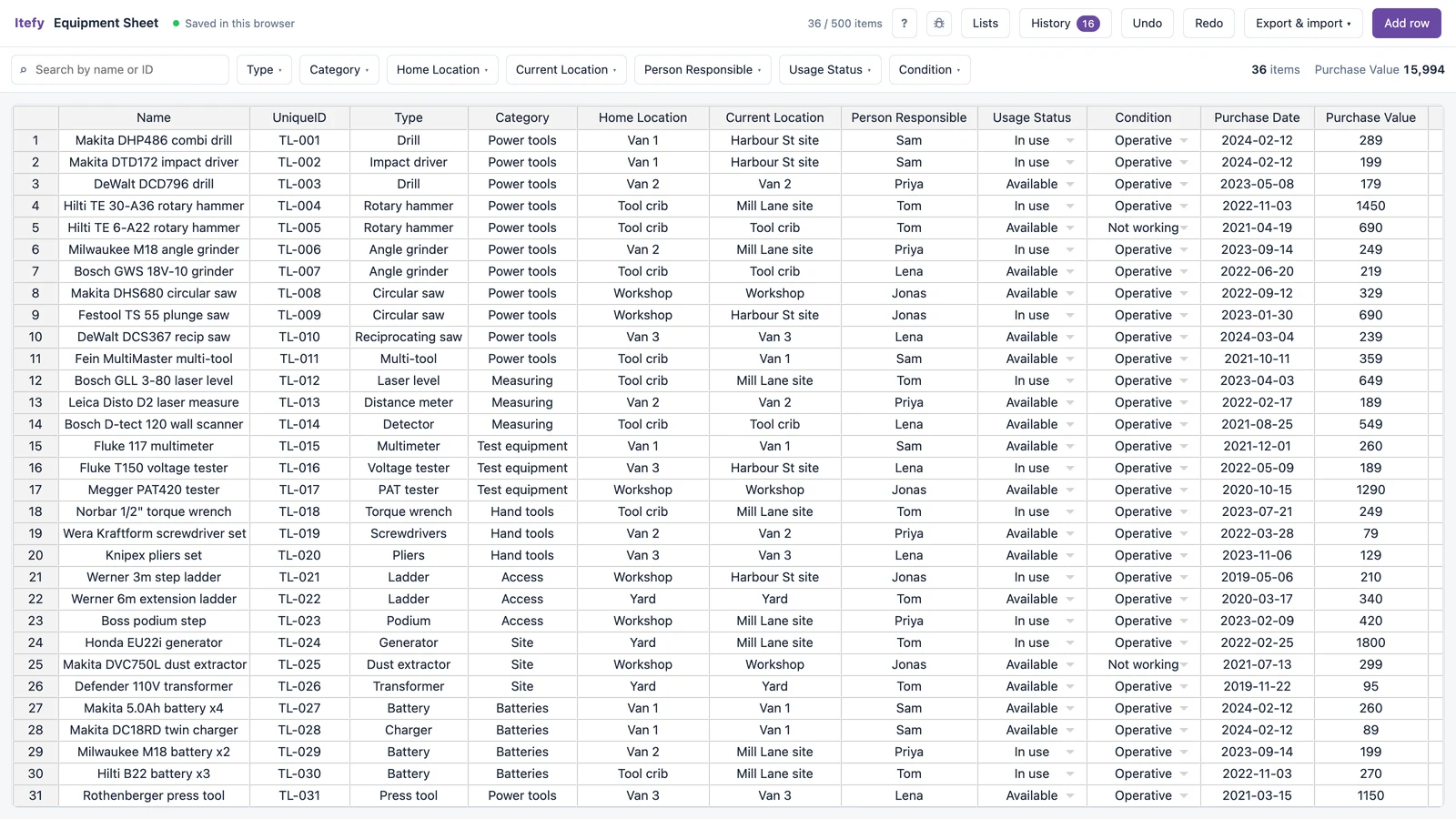
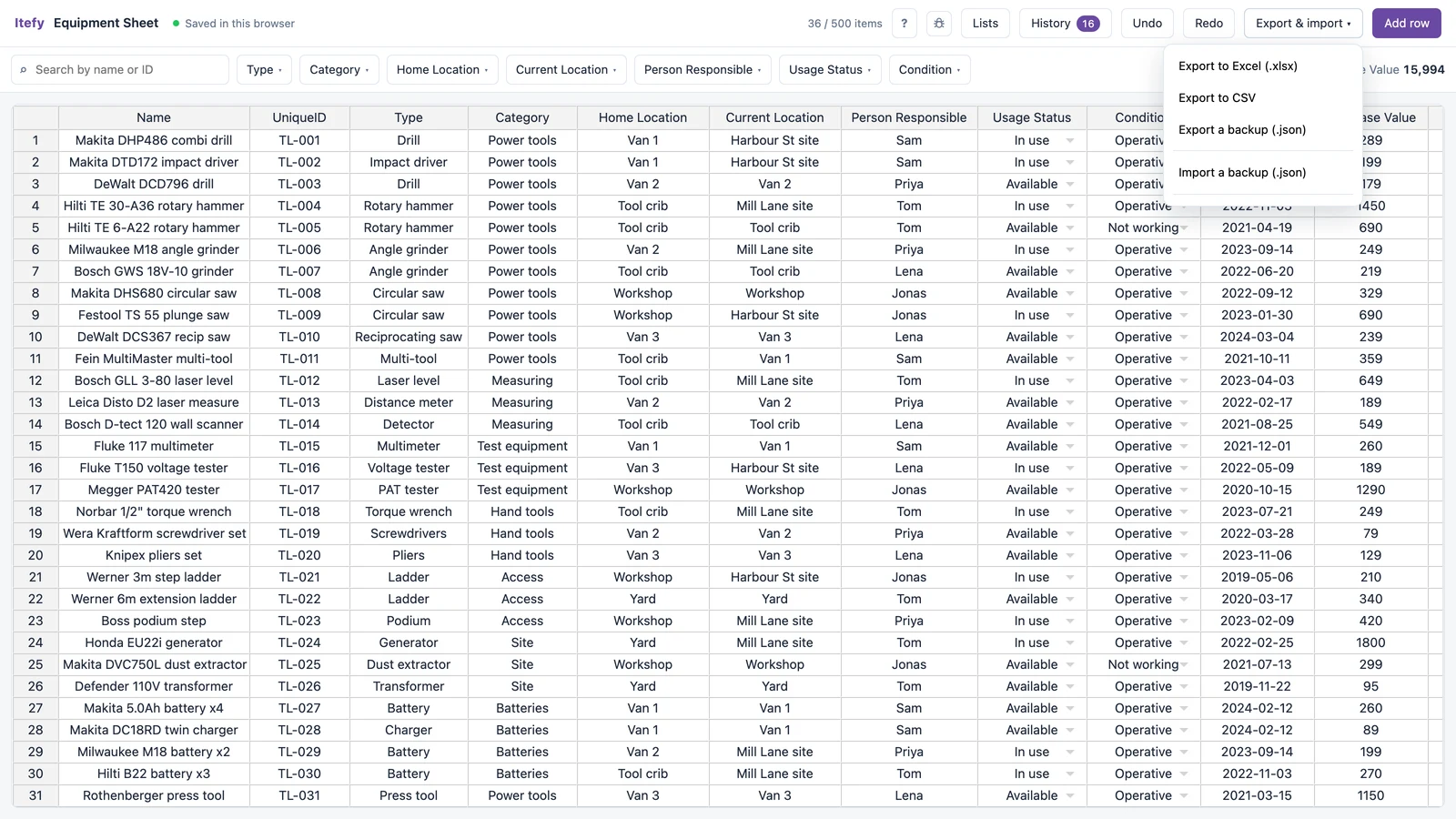
Fifteen columns, ready for a tool register: name, ID, type, category, home and current location, the person responsible, status, condition, purchase and expiry dates, values, specifications and notes. Only the name is required, so start with what is on the shelf and fill in the rest as you go.
- Home Location is where a tool belongs (the crib, Van 2), and Current Location is where it is today
- Type, category, location and person are managed lists: type Van 2 once and it is offered from then on, and the list editor merges the van2 that creeps in anyway
- Serial numbers, battery platforms and blade sizes go in Specs as key/value pairs instead of a crowded notes cell
- The ID column takes whatever is on the tool’s label or engraving
Sign tools out, and the sign-out log writes itself
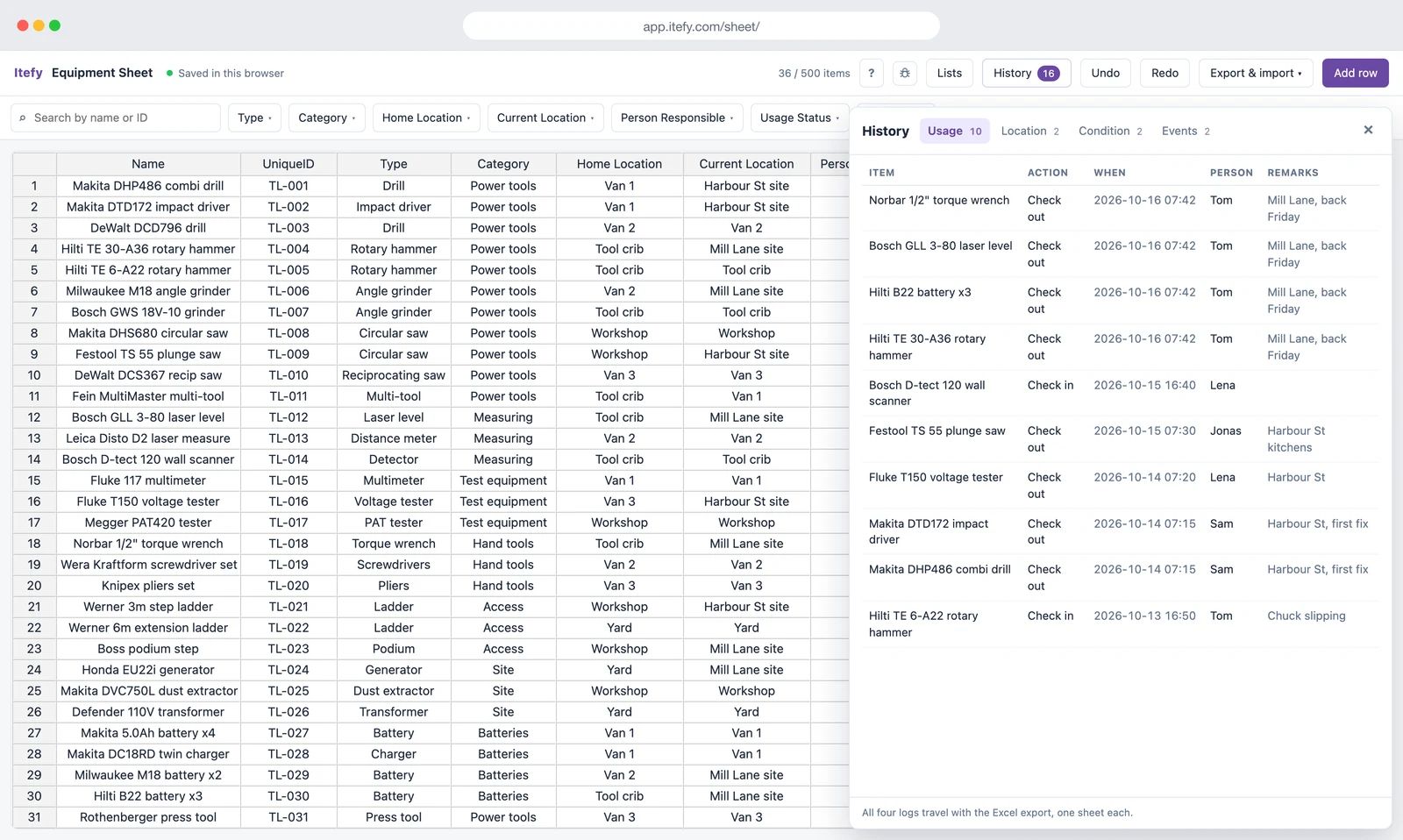
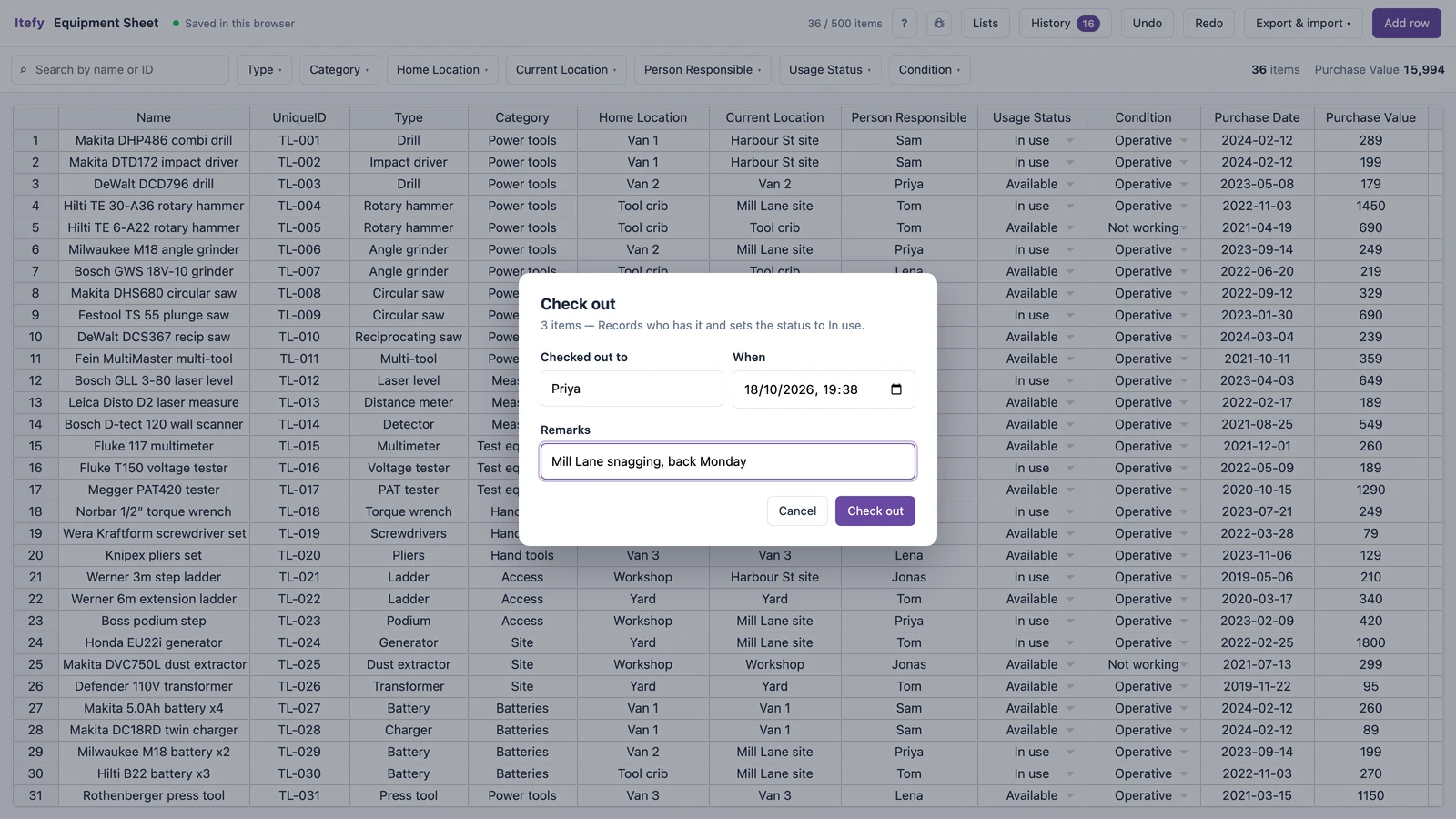
Select the tools, choose Check out and type who is taking them. The status changes to In use and a line goes into the usage log with the tool, the date, the person and your remark. Both happen in the same step, so the inventory and the log cannot drift apart. Checking a tool back in works the same way.
- Select several rows to sign a whole kit out to one person at once
- Move a tool to another van or site, and the location log records the move
- Mark a tool Not working when it comes back broken, with a note on what is wrong
- Log a service, a repair or a PAT test against the tool, with the date and who did it
- One undo takes the whole action back, log lines included
See which tools are out, and where
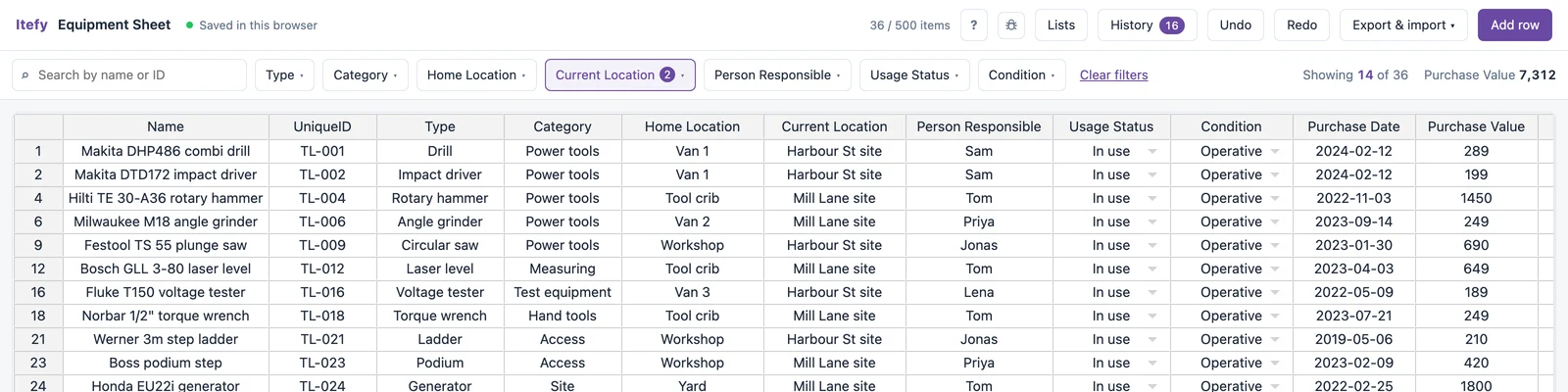
Filter any list column by ticking the values you want. Tick the two job sites under Current Location and you have every tool that is out on a job; tick In use under Usage Status and you have everything signed out. The totals follow the filter, so filtering to one van also tells you what the tools in it are worth.
- Search by name or ID, so the number on a tool’s label finds it
- Filters combine: Van 2 plus Not working is what needs fixing in that van
- Open the history to see who took each tool, when, and what for
Already have a tool list? Paste it in.
Copy the rows out of Excel, Google Sheets or Numbers and paste them into the grid. Last year’s audit, the insurance schedule, the list on the office PC: whatever you already typed does not have to be typed again.
- Paste a whole block of rows and columns in one go
- New values are offered to the matching list, so pasting builds your vans, sites and tool types for you
- The grid grows as you paste past the last row

Download it as a tool inventory template for Excel
Export a real .xlsx workbook, a .csv or a JSON backup whenever you like. Export before you type anything and you have an empty tool inventory template for Excel, with a blank usage log on a sheet of its own: a sign-out log with columns for the tool, the date, out or in, the person and remarks.
- The workbook holds your tool list, then a sheet each for the usage, location, condition and event logs
- Excel and CSV files open in Google Sheets, Numbers and LibreOffice too
- The JSON backup restores everything, history included, in any browser
- The column names match Itefy’s own importer, so the file maps itself if you ever move
What a tool spreadsheet cannot do
It records who took a tool. It cannot chase them. A check-out has no return date, so nothing is ever overdue and nobody gets a reminder. There are no photos, no QR labels to scan and no way for two people to edit the sheet at the same time. And it only knows what somebody types in: there is no GPS and no Bluetooth tag, so a tool that leaves without being signed out is still on the shelf as far as the sheet is concerned.
It is also free and unsupported, and until you sign in the list lives only in your browser: clearing your browsing data deletes it, and Safari clears it after about a week without a visit. Keep an exported copy, or sign in for free and it is stored in your account.
When those limits start costing you tools, that is the point where tool tracking software earns its keep.
Who keeps a tool list like this
The columns are generic on purpose, so they fit most places where tools are shared.
Contractors and site crews
Drills, saws, laser levels and ladders spread across vans, job boxes and sites.
ConstructionMaintenance teams
Hand tools, test gear and access equipment, with services and inspections logged against each one.
FacilitiesField service vans
What each engineer carries, van by van, and what it is all worth.
Location trackingProduction and rigging crews
Grip, rigging and electrical kit that goes out on a job and has to come back.
TV & filmWhen a tool spreadsheet stops being enough
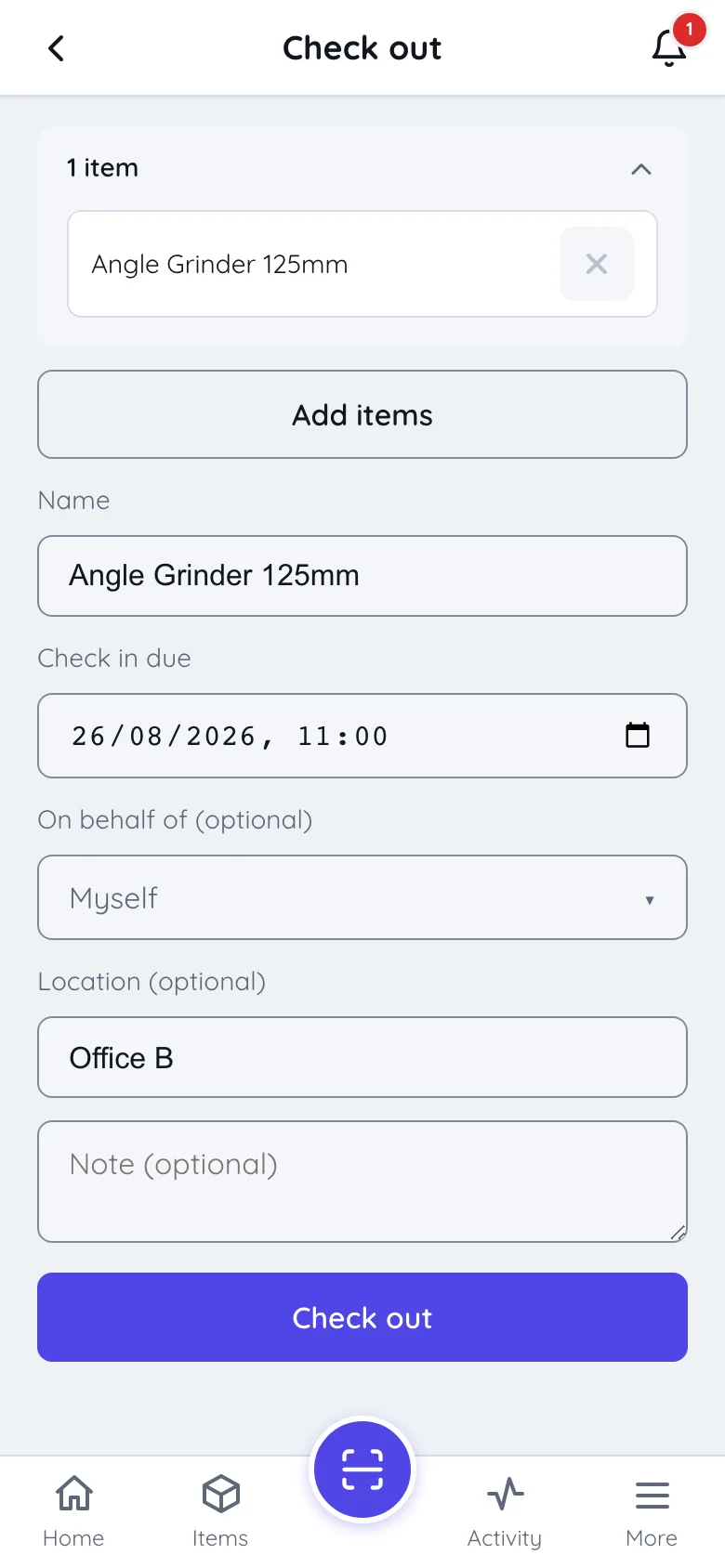
Usually it is one of three moments: a tool goes missing and the log cannot say who had it last, a second person needs to update the list from a van, or you want returns chased without doing the chasing yourself. Itefy is the same idea with those parts built in: QR labels scanned with any phone, check-outs with a due date and a reminder, toolboxes kept as kits, and one live list for the whole crew.
- Scan a tool’s QR label to check it out or in: no typing, no row to find
- A due date on the check-out, and a reminder when it passes
- Sign in to the sheet, and one click copies it into Itefy: tools, types, locations, values, specifications and categories
- It is a copy: your sheet stays exactly as it is, so trying Itefy risks nothing
Need a tool sign-out sheet on paper?
If the tools live in a crib with a clipboard by the door, a printed sign-out sheet still does the job. Our guide has a sign-out sheet template with the seven columns that settle arguments, including the due-back date and the initials this spreadsheet does not ask for. It also has the rules that keep a paper sheet honest.
Get the sign-out sheet template
Questions about the free tool tracking spreadsheet
Is the tool tracking spreadsheet really free?
Yes. Up to 500 tools cost nothing: no credit card, no trial that runs out, and no account needed to start. Signing in is optional and free as well, and it keeps the sheet in your Itefy account, so a cleared browser or a new laptop does not lose it.
Can I download it as a tool inventory template for Excel?
Yes. Open it and export before you type anything: you get an .xlsx workbook with the tool list columns on the first sheet, and an empty usage log, location log, condition log and event log on sheets of their own. It opens in Excel, Google Sheets, Numbers and LibreOffice.
What should a tool inventory list include?
At the least: the tool, a unique ID (the number on its label, or its serial number), where it belongs, where it is now and who is responsible for it. Condition and purchase value earn their place once there are more than a handful of tools. The spreadsheet has fifteen columns ready, and only the name is required.
How do I keep track of tools at work?
Give every tool an ID, decide where each one lives, and record every time one leaves: who took it and when. The spreadsheet does the last part in one step: check a tool out to a name, and the status and the log are written together. What it cannot do is remind anyone to bring a tool back. That is what tool tracking software is for.
Can I use it as a tool sign-out sheet?
Yes. Checking a tool out writes the date, the tool and the person to the usage log, and checking it in closes the loop. Export to Excel and the log is a sheet of its own. It does not ask for a return date or a signature; if you want those on paper, our sign-out sheet template has both.
Can it track tools in vans and on job sites?
Yes, as locations you name. Make each van, each site and the tool crib a location, and moving a tool updates where it is and logs the move. It only knows what somebody records, though: there is no GPS or Bluetooth tag, so a tool that leaves without being signed out still shows where it was last put.
Can I record calibration, servicing or PAT tests?
You can record them: log an event against the tool and it goes in the event log with the date and who did it. It cannot remind you when the next one is due, because the free sheet has no service intervals.
How many tools can it hold?
Five hundred. That is a deliberate cap rather than a trial limit: long before a crew has five hundred tools, the things a spreadsheet cannot do (reminders, scanning, several people updating it at once) start to matter more than the row count.
Where is my tool list stored, and can I lose it?
Until you sign in, it is stored in this browser and nothing is sent to us. That also makes it fragile: clearing your browsing data deletes it, and so does Safari after about a week without a visit. Export a copy now and then, or sign in for free and the sheet is kept in your Itefy account.
Start your tool list now
It opens into an empty sheet. No account, no email address, no credit card, and your tool list exports to Excel from the first row you type.