
AssetTiger alternative: one calendar, or one per asset?
AssetTiger is a genuinely capable asset register, and for a lot of teams it is the cheaper option — we’ll show you exactly where. It is also built around a different job than Itefy is. Here is what we found using both.
In this comparison
- What each one is built for
- Booking: they have it, so what’s different?
- Does a booking actually hold the equipment?
- Maintenance and repairs
- Where AssetTiger is genuinely stronger
- Mobile, API, sign-in and where it runs
- What each one costs
- Three questions that decide it
- What switching involves
- How we researched this
Choose AssetTiger if
- You need a fixed-asset register — depreciation, funding, insurance, audit reconciliation.
- You have more than three or four people and price is the deciding factor.
- You want deep configurability: editable schemas, custom lifecycle events, granular roles.
- Prebuilt reporting breadth matters more than a calendar.
Choose Itefy if
- Several people need to see what’s free and book it themselves.
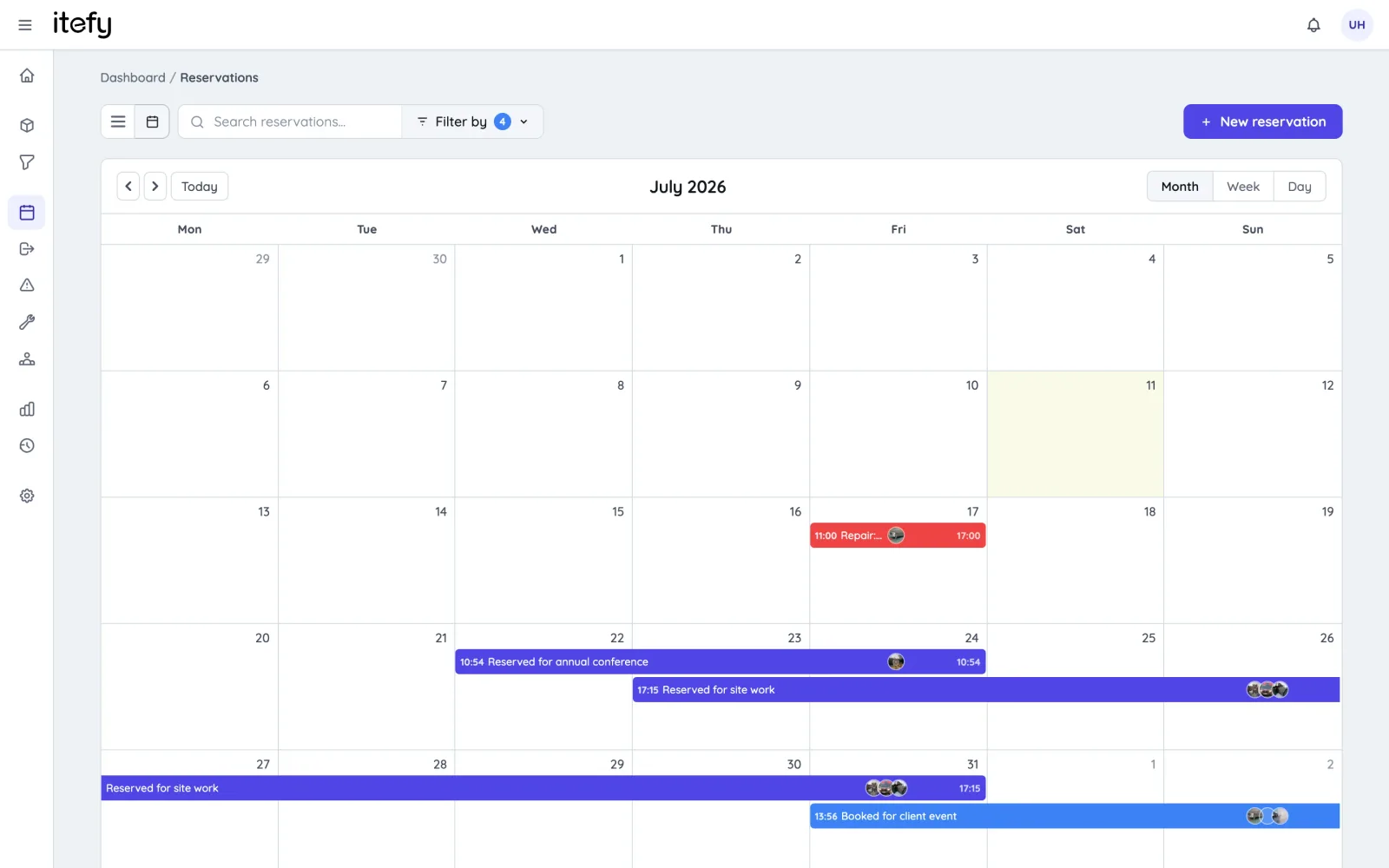
- You want one calendar across all your equipment, not one per item.
- Faults, repairs and service schedules belong in the same system as bookings.
- You need EUR or NOK billing, or a European operation.
What each one is built for
AssetTiger is an asset register at heart. Its centre of gravity is knowing what you own, what it cost, what it is worth now, who has it, and whether it can be accounted for at audit time. That shows in the details: five depreciation methods, registers for funding, insurance and contracts, a named audit-reconciliation workflow with a Location Discrepancy report, and default categories that read like a balance sheet — Building improvements, Leasehold improvements, Intangible assets. It is made by MyAssetTag, a company that manufactures asset labels; the software grew up alongside the tags.
Itefy is built around equipment that moves. The questions it is organised to answer are who needs the projector next Tuesday, whether the van is free on Thursday, what broke last week and whether it has been fixed since. The register is there — items, values, custom fields, complete history — but it exists to support the booking, handover and upkeep loop rather than the other way round.
Both products can do a version of the other’s job. The difference is which one they make easy, and that is what the rest of this page is about.
Booking: they have it, so what’s different?
Let’s clear something up first, because a lot of comparison pages get this wrong — including an earlier version of this one.
AssetTiger has reservations. You can reserve an asset for a date range, reserve it to a person, a site or a customer, add notes and send a confirmation email. There is a dedicated reservation report, a dedicated permission with an override sub-permission, and it understands linked assets, so reserving a kit reserves the whole kit. It is on every plan. Anyone telling you otherwise has not opened the product.
The difference is scope — where those bookings live, and who is able to make them.
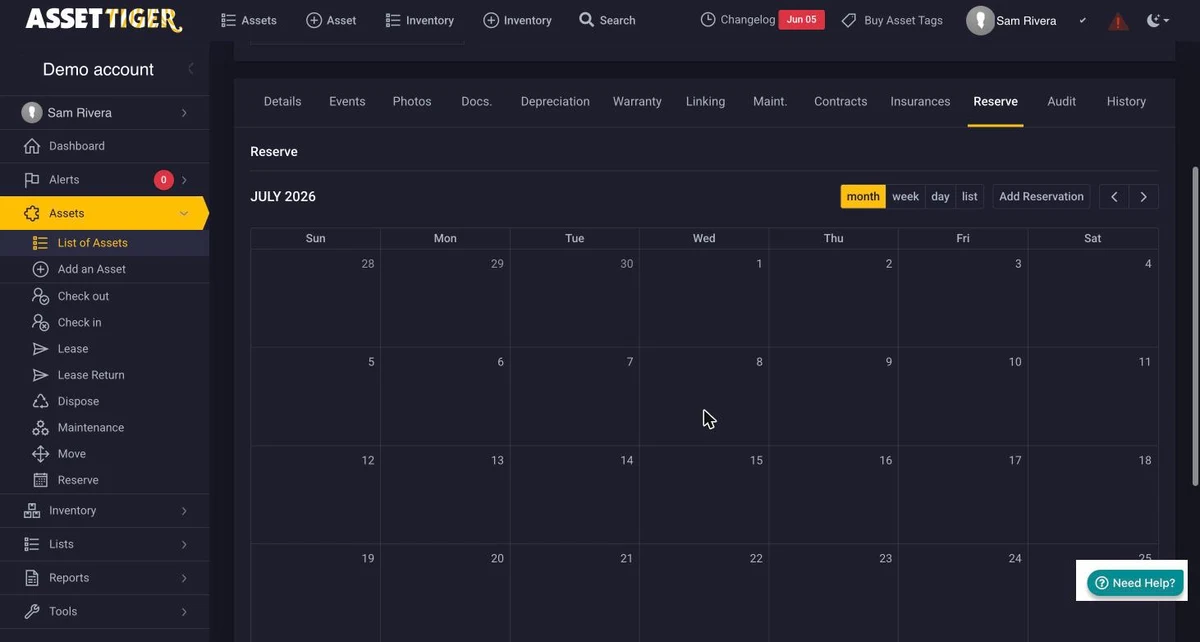
The calendar is per asset. Open a camera and you see that camera’s month. There is no organisation-wide booking calendar: to find out what is committed next week across your equipment, you run the reservation report and read a list. The dashboard does have a calendar, but it shows alerts — warranties, contracts, maintenance due — not bookings.
The second difference is who can book. In AssetTiger, the people equipment goes to are Persons/Employees — directory records, not logins. Users are a separate thing entirely. So every reservation is entered by somebody with an account, on somebody else’s behalf. This is why unlimited users helps less than it sounds: the constraint was never licence cost, it is that the people who actually borrow the gear have no way to ask for anything themselves.
| Capability | AssetTiger | Itefy |
|---|---|---|
| Reservations | Yes, on every plan | Yes, on every plan |
| Booking calendar | One asset at a time — no organisation-wide view | Every booking across all equipment, on one calendar |
| Who can book | Anyone with a login, on a person’s behalf | Borrowers book for themselves, or you book for them |
| Time of day | Whole days by default; an admin can switch times on | Times by default |
| Recurring bookings | Not available | Repeating series, Startup and up |
| Booking reminders | None — the seven alert types don’t cover reservations | Overdue and expired-reservation alerts |
| Availability search | Search filters on current status, not future availability | Check what’s free for a date range |
| Booking a kit | Linked assets book as a group, with a per-event “transact as a whole” flag | Kits in one reservation, nested up to five levels. Startup and up |
AssetTiger behaviour verified in the product, July 2026.
Does a booking actually hold the equipment?
This is the one thing on this page we would most like you to test for yourself, because it took five minutes and told us more than any feature list.
We reserved a kit in AssetTiger for 10–14 August, then tried to reserve it again for overlapping dates. It stopped us. A hard block rather than a warning, naming every affected asset in the kit, with no override offered even to an administrator. That is a real conflict check and it works.
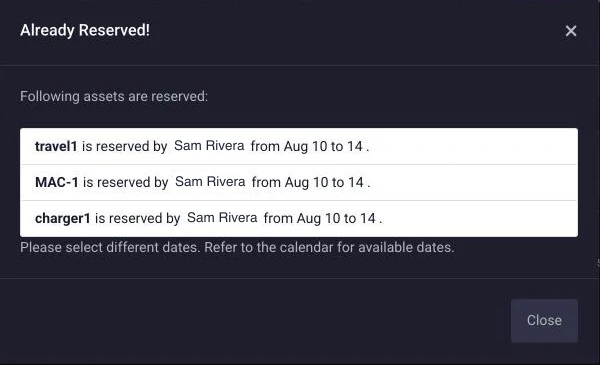
Then we did the other half. With the kit still reserved for 10–14 August, we checked the same kit out, dated 12 August — squarely inside the reservation window. It went straight through. No block, no warning, no confirmation prompt. The asset then read checked out and reserved for 10–14 August at the same time. Throughout, it had continued to show as “Available” in every list and picker, and the date pickers do not mark reserved days.
So the booking ledger is protected and the equipment is not. Nobody can double-book through the reservation form; anyone with check-out rights can walk off with a reserved item and the system will not say a word. In a real equipment room, that is the direction the problem usually comes from.
Run it yourself, in both
Five minutes, and worth more than this page:
- Reserve something for next week.
- Open the check-out screen and take the same thing, for the same dates.
- See whether you are stopped, warned, or let straight through.
We ran this once, in July 2026, on a free-plan account signed in as an administrator. It is their product and they can change it — which is exactly why we would rather you checked than took our word for it.
Maintenance and repairs
We under-rated this before we used it. AssetTiger’s maintenance is more than a reminder: a record carries a title, details, due date, assignee, cost and completion date, and moves through a five-state workflow — Scheduled, In progress, On Hold, Cancelled, Completed — with daily, weekly, monthly or yearly recurrence. There is a maintenance list with saved filters, Excel export, and its own import.
The limits are in the shape of it. The assignee is a free-text string, so nobody has a queue of their own jobs. Recurrence is fixed-interval only — no “every six weeks”, no day-of-month rules, and no usage triggers such as hours run, mileage or cycles. There are no parts or labour lines. And there are no checklists or inspection forms anywhere in the product; we went looking.
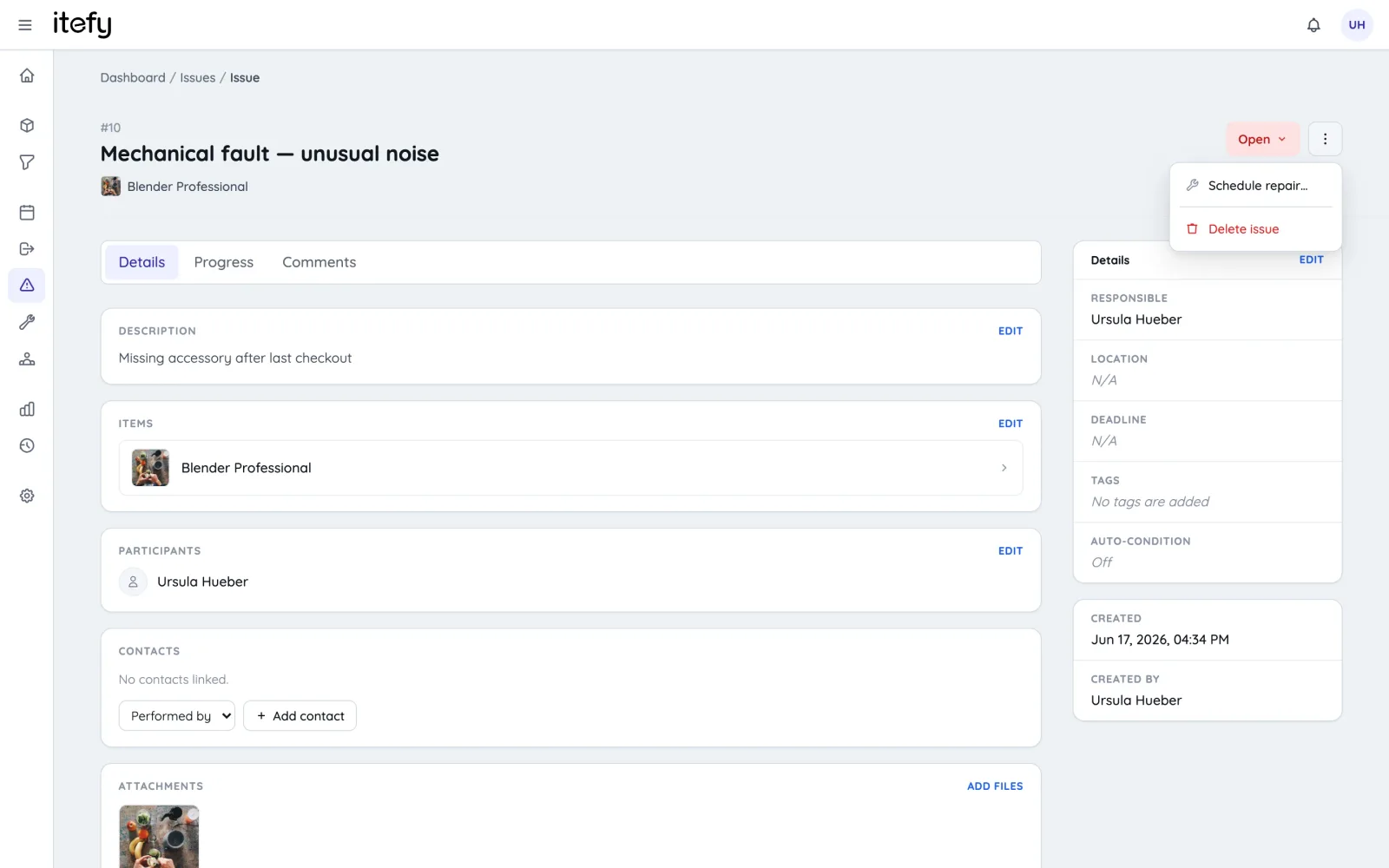
Itefy comes at it from the fault end as well as the schedule end. Anyone can report an issue from a phone with photos, and that issue is tracked through repair and stays on the item’s permanent history. Preventive schedules and inspections sit on the same calendar as bookings, so a service window blocks the item rather than colliding with a reservation nobody could see.
| Capability | AssetTiger | Itefy |
|---|---|---|
| Scheduled maintenance | Records with status, cost and a repeat schedule | Preventive schedules on the shared calendar |
| Recurrence | Daily, weekly, monthly or yearly only | Flexible repeating series |
| Fault reporting | Repair and Broken lifecycle events | Anyone reports an issue with photos and severity |
| Work assignment | Assignee is free text — nobody has a queue | Assigned to a real user |
| Checklists & inspections | None anywhere in the product | Inspections schedulable; no form builder |
| Meter-based triggers | No hours, mileage or cycles | Not available |
| History | Field-level audit trail per asset | Condition and repair history per item |
Where AssetTiger is genuinely stronger
Skipping this section would make everything above it less believable, so here it is.
Unlimited users on every paid plan. They charge by asset count, full stop. If you have forty people who touch equipment twice a year, that is a real structural advantage and it is not close. The pricing section below does the arithmetic against ourselves.
83 prebuilt reports. We counted them — fourteen categories, with CSV, Excel and PDF export plus print on every one. Any report can be scheduled to arrive by email daily, weekly, monthly or yearly, with a send time and day-of-week picker. Our reporting is narrower than that.
Configurability. This surprised us most. Whole subsystems can be switched off — depreciation, contracts, insurance, funding, warranties, audit. The schema is editable per table: standard fields can be hidden or made required, and there are fourteen custom-field types including GPS coordinates, auto-increment and a scanner type, each of which can be scoped to specific asset categories. Form layouts are drag-and-drop across six forms. You can invent your own lifecycle events. Permissions run to six tabs, with per-action asset grants, per-category filtering and around forty separate admin rights.
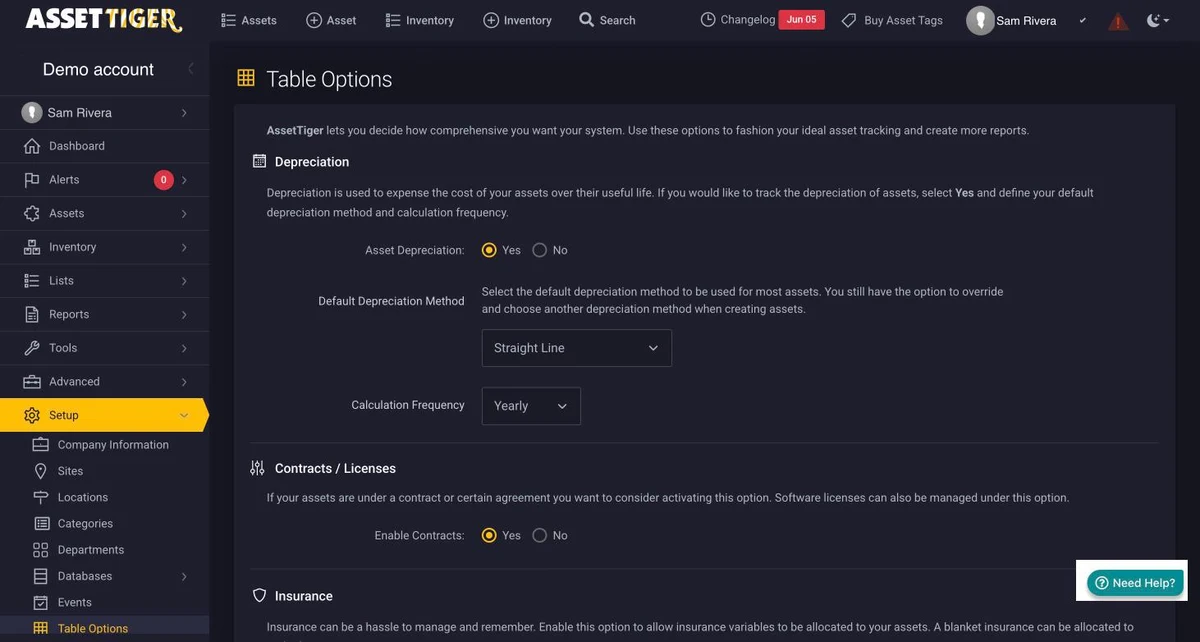
Fixed-asset accounting. Five depreciation methods, plus funding, insurance and contract registers and an audit-reconciliation workflow backed by six audit reports. If the reason you are buying is a finance or audit requirement, this is their home ground and not ours.
A free done-for-you import. Email them your spreadsheet and they will load it for you. That is a genuine switching barrier, working in their favour.
Labels from the same company. MyAssetTag manufactures the tags, and linking an account returns a share of label spend as credit. We do not match that.
Mobile, API, sign-in and where it runs
One thing worth calling out before the table: AssetTiger shipped an API in May 2026, and it covers inventory only — inventory items, transactions, categories, customers, persons, documents and images. There are no asset, check-out, reservation or maintenance endpoints. If you were planning to sync equipment with an ERP, an HR system or a job scheduler, the asset half of their product is not reachable yet.
On sign-in, neither of us will satisfy an enterprise procurement checklist: AssetTiger has email and password with optional two-factor, and Itefy has email and password or “Sign in with Google”. Neither offers SAML federation or SCIM provisioning.
| Capability | AssetTiger | Itefy |
|---|---|---|
| Mobile | iOS and Android apps with scanning | Itefy Go runs in any phone browser and installs to the home screen |
| API | Inventory endpoints only — no asset, checkout or reservation API | REST API, Business and up |
| Sign-in | Email and password, optional two-factor | Email and password, or Sign in with Google |
| Consumables | A separate Inventory plan — free to 2 items, then $15/month | Inventory tracking included |
| Import & export | 17 tables each way, plus a free done-for-you import | Guided CSV and Excel import; export any time |
| Billing currency | USD only, and the address form expects a US state | USD, EUR or NOK |
| Where it runs | United States; no data-residency statement in the product | Developed and operated in Europe |
Both products support a long list of display currencies and timezones. The row above is about which currency you are billed in.
What each one costs
Both products publish their prices and sell without a demo call, which makes this comparison unusually easy — much of the category makes you ask.
AssetTiger charges by asset count with unlimited users: $20/month ($220/year) for 500 assets, $40 ($440) for 2,500, $75 ($825) for 10,000. Itefy charges by capacity tier with a few seats included and cheap extra ones: $15/month billed yearly ($180) for 500 items and 3 users, $39 ($468) for 2,000 items and 5 users, with extra seats at $3–5/month.
| Your size | AssetTiger | Itefy | Cheaper |
|---|---|---|---|
| Up to 500 items, 3 people | $220/yr | $180/yr | Itefy |
| Up to 500 items, 4 people | $220/yr | $240/yr | AssetTiger |
| Up to 500 items, 10 people | $220/yr | $600/yr | AssetTiger, by 2.7× |
| 500–2,000 items, any number of people | $440/yr | from $468/yr | AssetTiger |
| 500–2,000 items, 10 people | $440/yr | $768/yr | AssetTiger, by 1.7× |
List prices, yearly billing, both pricing pages checked July 2026. Prices change — check both before deciding.
Read that table again, because it does not flatter us
Itefy is cheaper in exactly one band — up to 500 items and three or fewer people. AssetTiger is cheaper everywhere above it, by a widening margin. If your decision is mostly about price and you have more than three or four people, they win it, and you would have worked that out in thirty seconds anyway.
What the table cannot show is what those seats buy. AssetTiger’s extra users are people who can operate the system on others’ behalf; they do not give the borrowers themselves a way in, because borrowers are not users at all. Itefy’s seats are people who can book their own equipment. Whether that difference is worth the money depends entirely on how many people in your organisation need to ask for something — which is the question this whole comparison turns on.
Two more things worth knowing. AssetTiger’s asset tiers are coarse — 500, then 2,500 — so an organisation with 600 assets pays the 2,500 price. And their billing is USD only.
On free plans: AssetTiger has historically offered one, and its terms have been changing during 2026 — check their pricing page for what is current rather than trusting any comparison page, including this one. Itefy has no free plan and we are not going to dress the trial up as one: 14 days, every feature, no credit card, no setup fee, and your data stays exportable for 30 days if you decide against it.
Three questions that decide it
Three questions settle this faster than any feature table.
-
How many people need to ask for equipment?
If it is one or two coordinators who record what everyone else takes, AssetTiger’s model fits and its pricing rewards you. If it is twenty people who each want to see what is free and book it, you will be re-keying requests forever.
-
Is the register the point, or the operation?
Depreciation, funding, insurance and audit reconciliation are what AssetTiger is for. If Finance is the reason you are buying, buy theirs.
-
What happens when two people want the same thing?
Run the test above in both trials, with your own equipment. Whatever you find will be more use than either vendor’s feature list.
What switching involves
Your labels keep working. Itefy scans QR and barcode labels with any phone camera, including MyAssetTag ones, so nothing needs re-tagging. That is usually the expensive part of a move, and it does not apply here.
Your data comes out. Credit where it is due: AssetTiger exports 17 tables and does not hold data hostage. Export what you need, then import to Itefy with the guided wizard — it maps your columns to Itefy fields and lets you review and adjust every row before anything is created.
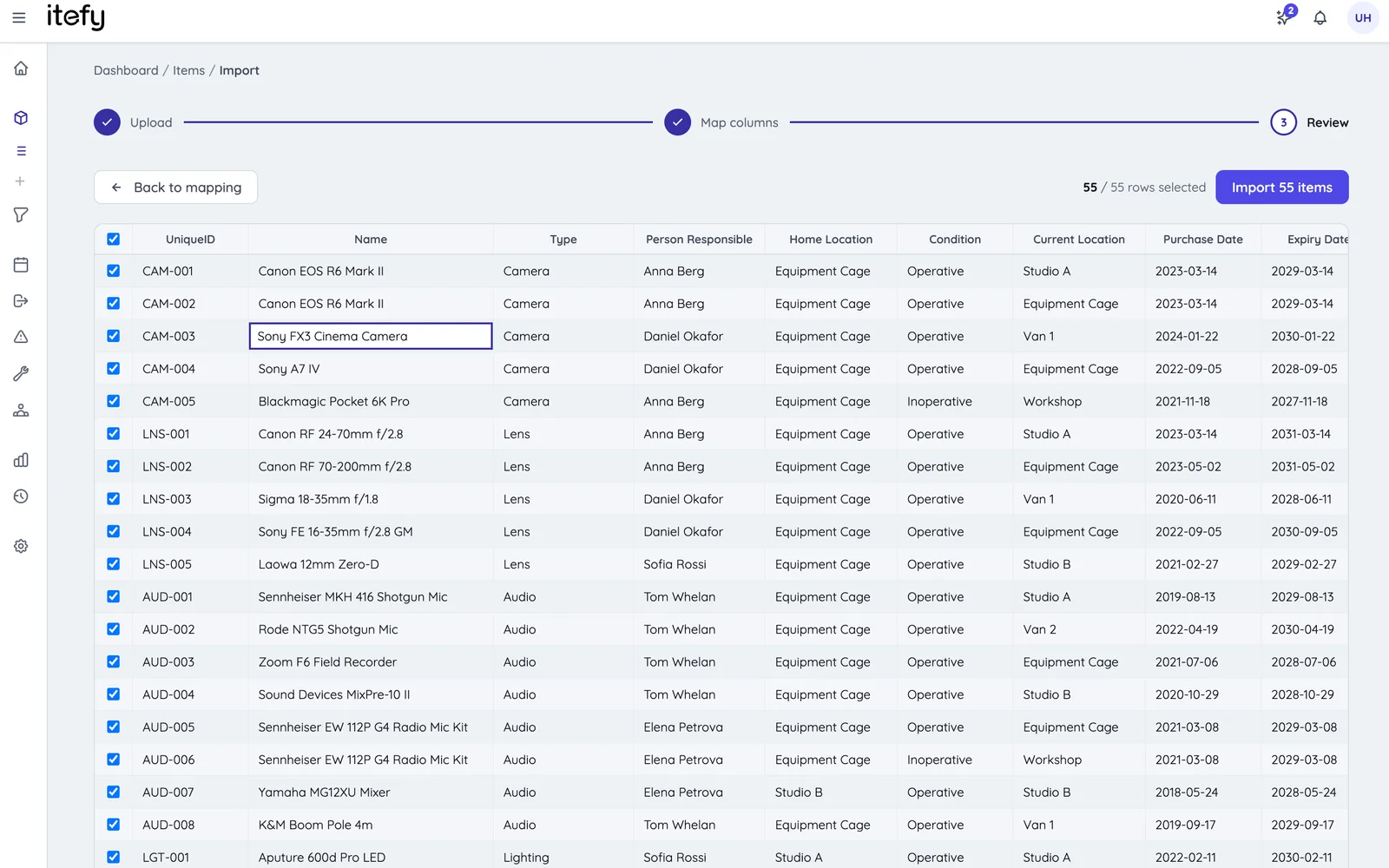
And it goes both ways: you can export everything out of Itefy at any time too. Neither of us is trying to trap you.
How we researched this
- Everything stated about AssetTiger was checked by using it — a logged-in walkthrough of the web app on our own trial account in July 2026, recorded with screenshots.
- The reservation and check-out behaviour above was tested by creating real bookings, observing what happened, and then removing them. It was tested once, as an administrator, on a free-plan account.
- Where something could not be established without saving a setting, we have not claimed it. The time-of-day booking option is one such case: we found the switch, we did not turn it on.
- Screenshots of AssetTiger are from our own account. The account name and the signed-in user have been replaced with placeholders.
- Prices come from both published pricing pages in July 2026.
- Products change, and theirs is actively developed. If we have got something wrong, tell us at support@itefy.com and we will correct it — we have had to correct this page before.
Questions people ask
-
Yes — on each asset. The asset’s Reserve tab has month, week, day and list views. What it does not have is one calendar across all your equipment; for that you run the reservation report and read a list.
-
It has historically offered a free plan, and the terms were changing during 2026, so check their pricing page for what is current. Itefy has no free plan — there is a 14-day trial of every feature with no credit card required.
-
AssetTiger, in most cases. They charge by asset count with unlimited users, so above about four people they are cheaper and the gap widens with headcount. Itefy is cheaper up to 500 items and three people. The full breakdown is in the pricing section above.
-
No. The people equipment goes to are directory records without logins, so every reservation is entered by someone with an account, on their behalf.
-
Yes. Itefy scans QR and barcode labels with any phone camera, including MyAssetTag labels, so you do not need to re-tag anything.
-
Items carry purchase and depreciation values and there are asset-value reports, but Itefy is not a fixed-asset accounting product. AssetTiger’s five depreciation methods, funding and insurance registers and audit reconciliation go considerably further.