
Free Asset Management Software: What's Actually Free in 2026
We checked the licences and the pricing pages of the tools everyone recommends. One of the most-cited free plans in this category quietly became a 30-day trial, and most "free" software is free in a way that costs money. Here is what each option actually gives you.
The short version
- AssetTiger's 250-asset free plan is gone — its pricing page now calls that tier a 30-day trial that drops to view-only. Most lists still say it is free.
- Snipe-IT is the strongest genuinely free option for IT hardware — AGPL-3.0, no cap on assets or users — but it has no booking calendar.
- Shelf's free tier is the only uncapped one here: unlimited assets, but exactly one user. A second person costs $67/month.
- The licence is the cheapest part of self-hosting. The real cost is a server, tested backups, patching, and a named person who owns it.
- Free tools answer "what do we own". Paid ones earn their money on "where is it, who has it, and is it safe to use".
In this article
- "Free" means four different things
- The eight options, compared
- What free actually costs
- When free is the right answer
- When it stops being the right answer
- Where Itefy fits
- How to choose
Search for free asset management software and you get the same nine or ten names, copied between articles, usually with the same limits attached to them. We went and read the licences and the current pricing pages instead.
The first thing we found is that one of the most widely recommended free plans in this category is no longer free. AssetTiger's 250-asset tier — cited as free in practically every list, including the two articles that currently outrank this one — is now labelled, on AssetTiger's own pricing page, a 30-Day Trial with limited access. This is what it looks like today:
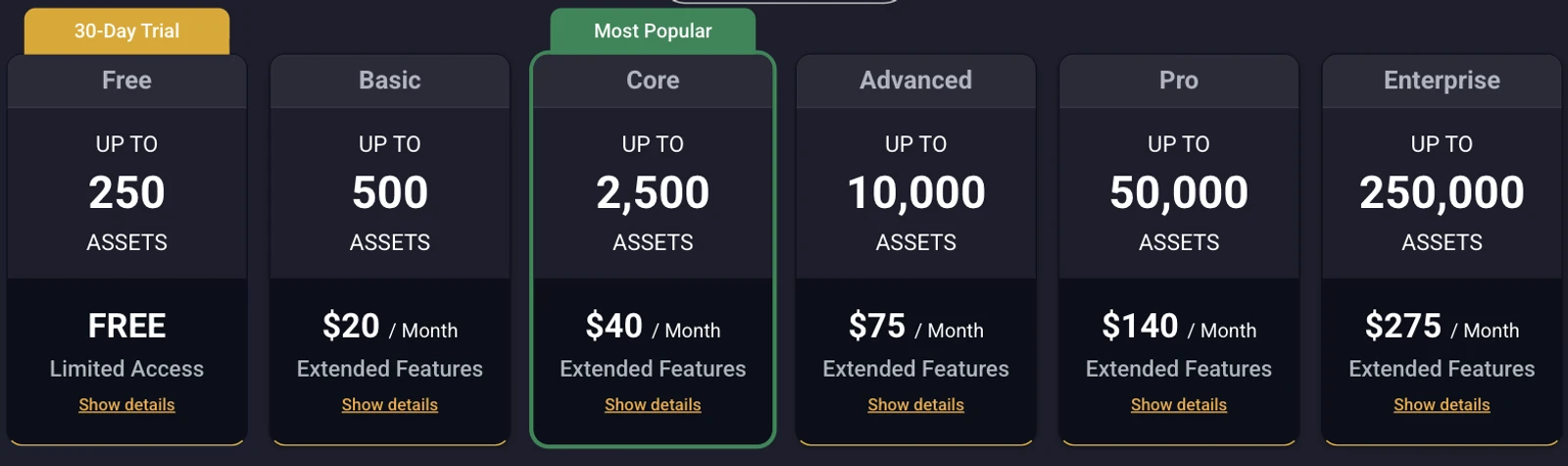
That is not a small correction. It is the difference between a tool you can build a small asset register on and a tool that stops letting you edit your own data after a month.
So this article does two things. It says what each option genuinely gives you in 2026, and it is honest about the second question nobody in this category answers: what free actually costs once it is running.
We should say plainly where we stand. Itefy is a paid product and there is no free tier — a 14-day trial and then a subscription. That is declared at the top rather than buried, and there is a section further down about when a free tool is the better answer, which is more often than a vendor blog usually admits.
"Free" means four different things
Almost every argument about free asset management software is really two people using the word to mean different things. There are four distinct models, and which one you are looking at determines what it will cost you and how long it will last.
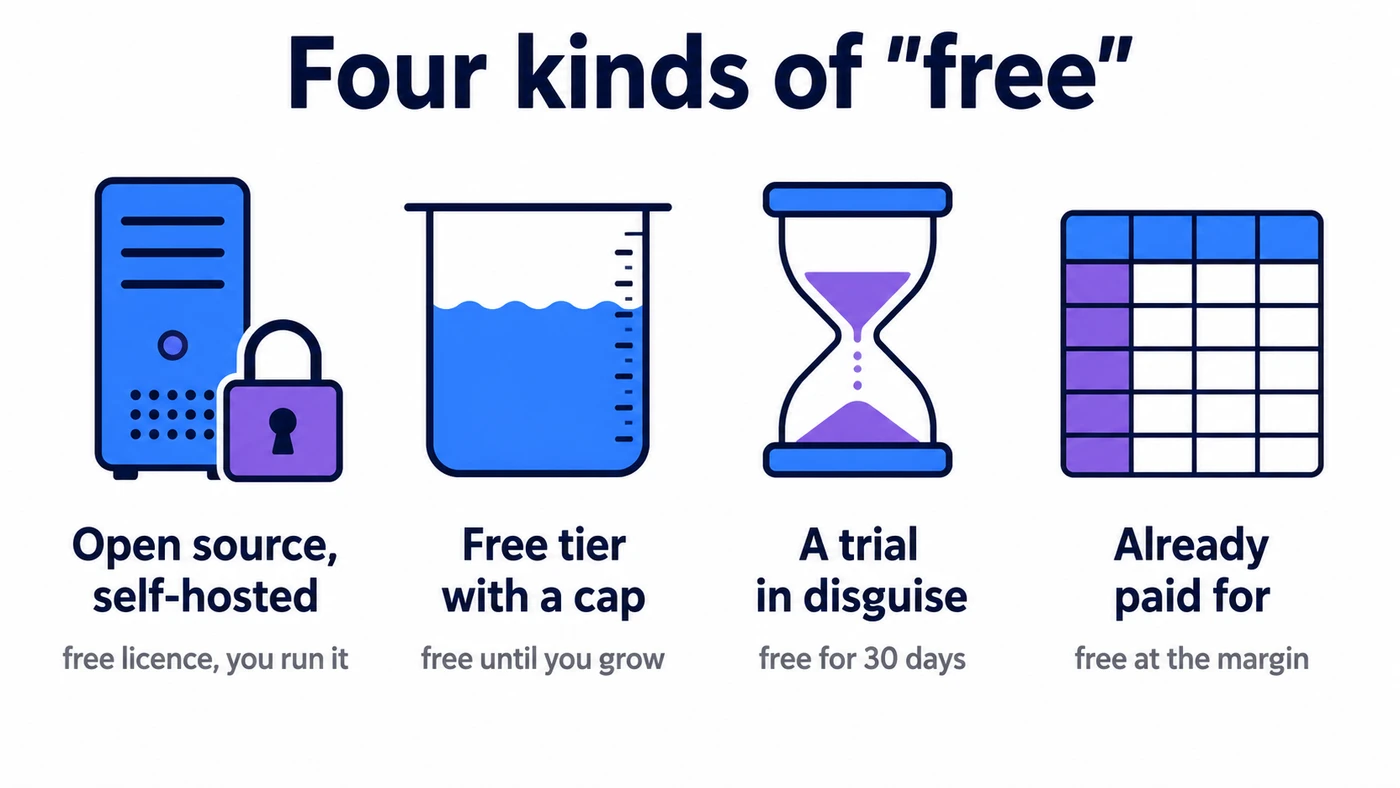
Open source, self-hosted. The software is free under a licence that keeps it free — usually AGPL or Apache. Nobody can revoke it, there is no asset cap, and you can read the code. You provide the server, the backups, the TLS certificate, the upgrades and the person who does all of it. Snipe-IT, GLPI, openMAINT and Ralph are here.
A free tier with a hard cap. A commercial product with a permanently free plan, limited by assets, users or features. Free forever within the cap, and a pricing decision the day you cross it. Shelf's Personal plan is the honest example in this category.
A trial wearing a free plan's clothes. Presented in the pricing grid as a free tier, with a clock attached. AssetTiger is now here, and it is the reason this article starts where it does.
Software you already pay for. Excel, Google Sheets, a database tool bundled with a licence you hold anyway. Free at the margin, not free in absolute terms, and by far the most common way small teams actually track equipment.
Nothing on this list is wrong to use. But a free tier with a cap and an AGPL licence fail in completely different ways, and it is worth knowing which failure you are signing up for.
The eight options, compared
| Tool | Model | What free gets you | Paid from | Best at |
|---|---|---|---|---|
| Snipe-IT | Open source (AGPL-3.0) | Unlimited assets and users, self-hosted | $39.99/mo hosted | IT hardware assigned to staff |
| GLPI | Open source (GPL) | Full ITAM plus helpdesk, self-hosted | €19/user/mo cloud | IT teams wanting ITAM + tickets |
| Shelf | Free tier (AGPL self-host) | 1 user, unlimited assets, 3 custom fields | $34/mo | A single person tracking physical gear |
| openMAINT | Open source | Full CMMS, self-hosted | Quote | Maintenance and facilities |
| Ralph | Open source (Apache 2.0) | Full DCIM/CMDB, self-hosted | — | Data centre hardware |
| AssetTiger | 250 assets for 30 days, then view-only | $20/mo (500 assets) | Trying a hosted tool quickly | |
| Sortly | Free tier | 100 items, 1 user | $49/mo (500 items, 2 users) | A photo-led inventory kept on a phone |
| Excel | Already paid for | A register, if one person owns it | Microsoft 365 | Under ~100 items, one editor |
The column that matters is the third one. Everything else in this market gets compared on feature checkmarks, and feature checkmarks are close to meaningless when the products differ this much in what they are for.
Each tool below closes with a scorecard on the same five criteria, so they can be read against one another. They are our judgement rather than a benchmark, and they rate the product as a whole — how much of it you get for nothing is the first line. The total is an unweighted sum out of 25, so it rewards being decent at everything and will flatter a tool that is easy to start but shallow: read the rows that matter to you rather than the number at the bottom. We have not scored Itefy. It is our product, and a score we gave ourselves would be worth nothing to you.
Snipe-IT
The default recommendation in this category, and it earns it. Snipe-IT is a dedicated IT asset manager under AGPL-3.0 with around 14,800 GitHub stars, built on Laravel, and available as a Docker image. Self-hosted, it has no cap on assets or users at all.
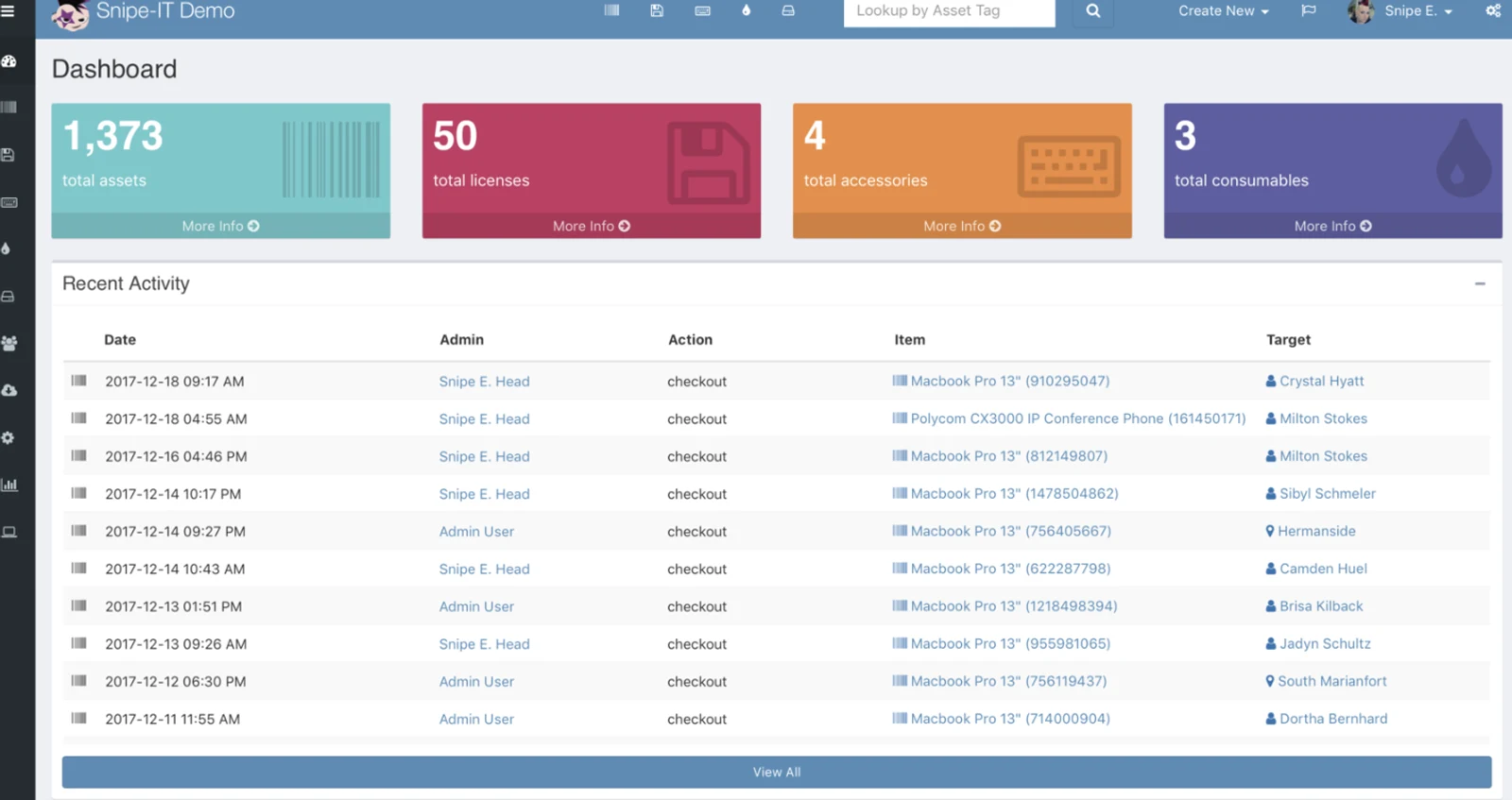
It is built around a specific idea: hardware belongs to people. Assets get assigned to a user, checked out, and returned when someone leaves. Licence seats, accessories and consumables are modelled separately from assets, which is exactly right for IT and slightly awkward for anything else.
Where it fits. Laptops, monitors, phones, licences — anything with a serial number that lives on somebody's desk.
Where it does not. It is not a booking system. There is no calendar, no reservation of gear for next Tuesday, no conflict detection when two people want the same camera. If your equipment moves between people on a schedule rather than being issued once, that gap is the whole problem.
Snipe-IT also sells hosting from $39.99/month if you would rather not run it, which is a reasonable way to buy the software while skipping the server.
We have written a longer, fairer piece on where the two products differ on our Snipe-IT alternative page, including the things Snipe-IT does better.
GLPI
GLPI is the European heavyweight — open source, in production at Airbus, La Poste and Telefónica, and considerably broader than Snipe-IT. It combines asset management with a full helpdesk and a CMDB, so tickets and the hardware they concern live in the same system.
The trade-off is proportional. GLPI is a large application with a real administration burden, and its interface reflects two decades of accumulated capability rather than a modern product design pass. Teams who adopt it usually have someone who becomes the GLPI person.
Self-hosting is free. Teclib' sells GLPI Network support from €100/month for up to 10 agents and 500 assets, and a managed cloud from €19/user/month with a 45-day trial.
Where it fits. An internal IT team that wants ITAM and ticketing together and has the capacity to run it.
Shelf
Shelf is the most interesting entry, because it is the one genuinely free plan on this list that has not quietly changed. It is AGPL-3.0 with community Docker support for self-hosting, and the hosted Personal plan is $0/month with unlimited assets for a single user and three custom fields.
Unlimited assets on a free tier is unusual and worth taking seriously. The catch is the number one — one user, one personal workspace. The moment a colleague needs to see what you see, you are on Team at $67/month, because collaboration is precisely what Shelf charges for.
Where it fits. One person responsible for a lot of physical equipment. A freelance operator, a single-site coordinator, a one-person facilities role.
Where it does not. Anything involving a second person.
openMAINT
openMAINT approaches equipment from the maintenance side rather than the inventory side. It is an open-source CMMS built on CMDBuild, maintained by PAT srl, and it models plants, assets, work orders, preventive maintenance schedules and facility management.
If the question you are trying to answer is "what needs servicing next month" rather than "who has the drill", this is a better starting point than any IT asset tracker.
The honest warning is configuration. openMAINT is a framework as much as a product, and a useful deployment involves modelling your own data structures, workflows and reports. PAT sells subscriptions, support packages and training precisely because most organisations need help doing that. Budget real implementation time, not an afternoon.
Ralph
Ralph is Allegro's open-source Apache 2.0 asset manager and DCIM, at roughly 2,500 GitHub stars. It is genuinely capable for data centre inventory — racks, hosts, networks, hardware lifecycle.
One thing to know before adopting it: as of February 2025 Allegro publishes Ralph under a "sources only" model and states plainly that they "do not guarantee responses to issues or support for pull requests." The code is there and the project is maintained for Allegro's own use. Community support runs through a Discourse forum.
Where it fits. Data centre and server estate, if you are comfortable owning your own deployment without a support expectation.
Where it does not. General equipment. Ralph is aimed squarely at infrastructure.
AssetTiger
AssetTiger is a hosted, cloud-based asset tracker with a mobile app and barcode support, and for years its 250-asset free plan was the standard recommendation for small organisations that did not want to run a server.
That plan is gone. The current pricing page lists it as a 30-Day Trial, up to 250 assets, "Limited Access". Their terms describe accounts that have not upgraded moving to view-only when the trial ends — your data stays readable, but you stop being able to add or edit.
Paid plans are priced by asset count with unlimited users, starting at $20/month for 500 assets and rising to $275/month for 250,000.
We are not making a criticism of the change; charging for software is legitimate, and their per-asset-not-per-user pricing is friendlier than most. The criticism is of every listicle still telling readers it is free, including the ones ranking above this article. If you picked AssetTiger because a comparison page said it was free, check your account before you put 250 assets in it.
Our AssetTiger alternative page compares the two products directly.
Sortly
Sortly is the hosted, photo-led inventory app most small teams meet first, and it has a genuine free tier: 100 unique items and one user, with the mobile app included. For a hundred things looked after by one person that is a real product, not a trial, and it is pleasant to use — the item cards are pictures, which suits gear that is easier to recognise than to name.
Two things to know before you build on it. The free tier is one seat, so the moment a second person needs to record anything you are on Advanced at $49/month (500 items, 2 users), and the ladder above that is $149 and $299. And Sortly is an inventory system rather than a lending system: users report no advance booking or reservation of equipment, and no maintenance module or work orders — items can be tagged as needing maintenance, but there is no schedule and nothing to log the job against.
That is the line worth drawing for this article's reader. If your question is "what do we own and what is it worth", Sortly answers it inside the free tier. If your question is "who has it, when is it back, and is it still working", the free tier does not reach, and neither does the paid one.
Excel
Excel deserves better than the dismissal it usually gets in vendor blogs, including the earlier version of this one.
For under about a hundred items, with one person maintaining it, a spreadsheet is a perfectly good asset register. It is instant, everybody knows it, it prints, it sorts, it does depreciation with a formula, and there is no migration to do because you already have it.
Two corrections to the usual claim that it is free. Desktop Excel needs a paid Microsoft 365 licence. Excel for the web is free with a Microsoft account and is the version that genuinely costs nothing — worth knowing, because it is also the version that shares properly.
Where a spreadsheet stops working is specific and predictable, and it is not about size. It is the moment the sheet has to answer state rather than facts. Who has the projector right now. Whether that ladder was inspected. Whether anyone booked the van for Thursday. A spreadsheet records what someone last typed, and nothing tells you when that stopped being true.
The second failure is concurrency. Two people editing the same sheet produces
inventory_final_v3_JOHNS_COPY.xlsx, and now there are two registers and no way to
know which is right.
We wrote a longer comparison at Itefy vs Excel, and there is a free equipment inventory database guide if a spreadsheet is where you are starting.
Our own free equipment tracking spreadsheet belongs in this row rather than in the software list: it is a browser spreadsheet with equipment columns and a check-out action, capped at 500 items, with no account required. It closes the first failure above — it records who took something and when — and not the second, because two people still cannot edit it at once.
What free actually costs
This is the part the comparison tables leave out, and it is the reason plenty of free deployments end up abandoned.
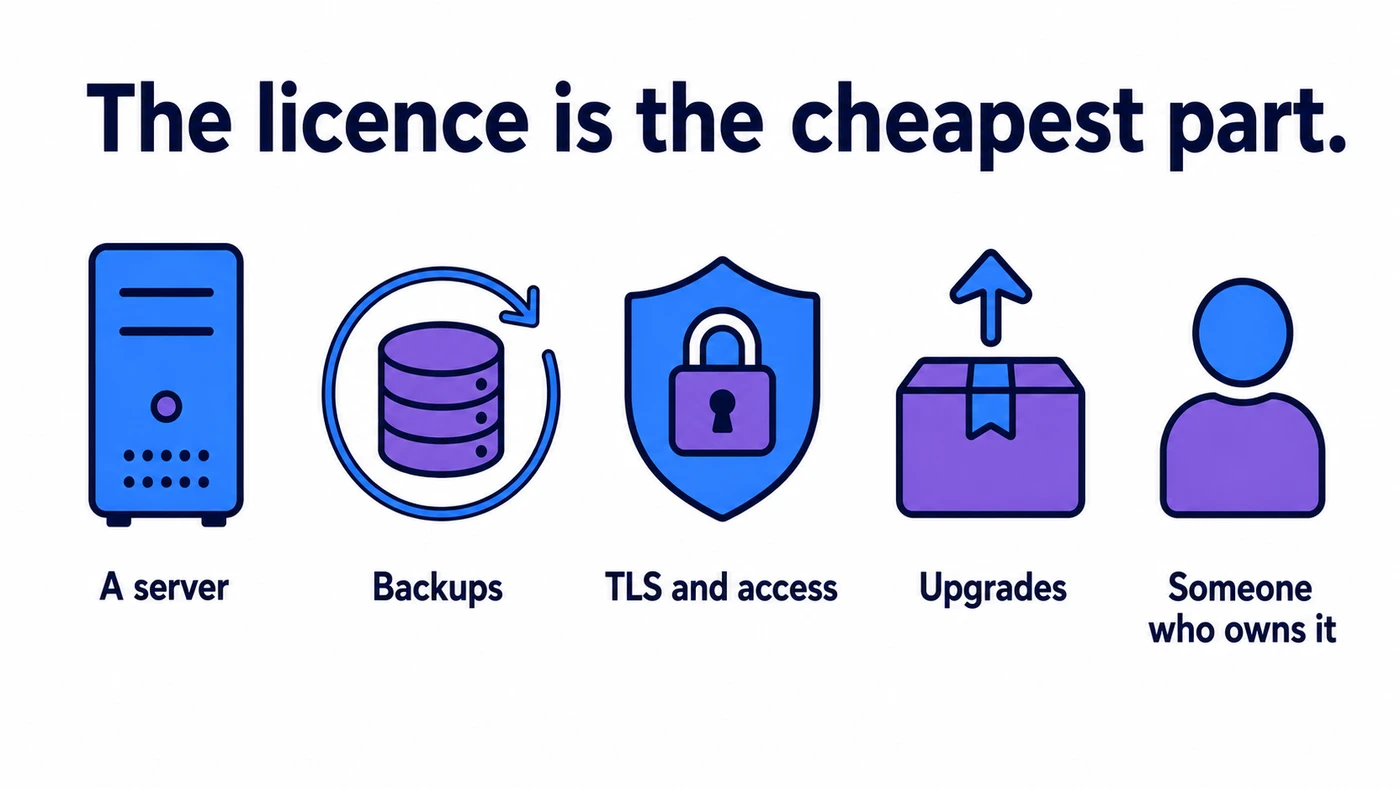
An AGPL licence costs nothing. Running the application does:
A server. A small VPS runs Snipe-IT or Shelf comfortably for a few dollars a month. Genuinely cheap, and genuinely not zero.
Backups you have actually restored. An untested backup is a belief, not a backup. This is the single most common gap we see in self-hosted deployments, and it is only discovered on the worst possible day.
TLS and access. A certificate, renewal, and a decision about whether this is exposed to the internet or lives behind a VPN. Asset registers contain serial numbers, purchase values and staff names.
Upgrades and security patches. Snipe-IT is on Laravel; GLPI has a long CVE history like any widely deployed PHP application. Somebody needs to apply those, and "somebody" is the operative word.
A named owner. This is the real cost. Every one of the above is a small job. Together they are a standing commitment, and the failure mode is not dramatic — the install just drifts three versions behind, the backups stop, the person who set it up changes role, and eighteen months later nobody is quite sure whether it is still running.
None of this argues against self-hosting. It argues for being deliberate about it. If you have an IT function, running Snipe-IT is a completely reasonable Tuesday. If your organisation's IT is a person who is mostly something else, the free tool is the expensive one.
When free is the right answer
We would rather you picked correctly than picked us. Free is genuinely the right call when:
- You need a register, not a workflow. A definitive list of what you own, what it cost, what its serial number is, and where it lives. Snipe-IT, GLPI and even a spreadsheet do this well.
- The equipment does not move much. Assets issued once and returned at offboarding are a different problem from gear that circulates weekly.
- One person is responsible. Shelf's free tier is excellent for exactly this.
- You have IT capacity. If running a small web application is already normal for your team, the licence saving is real and the operational cost is near zero.
- You are proving the idea. Standing up Snipe-IT to find out whether anyone will keep an asset register updated is a sound, cheap experiment.
When it stops being the right answer
The transition is usually not about running out of assets. It is about the questions changing.
Free asset tools are built to answer what do we own. The moment the pressing question becomes where is it, who has it, when is it back and is it safe to use, you are asking for something registers do not do: reservations that do not collide, a check-out state that is true right now, a condition that can stop a booking, and a maintenance history attached to the item rather than to somebody's memory.
You will recognise the moment. Someone drives to a site for equipment that is not there. Two departments book the same trailer. An item fails an inspection and gets checked out the following week anyway, because the failure was recorded in a different system from the one used to book it.
Where Itefy fits
Itefy is not free, and we are not going to end an article about free software by pretending otherwise. There is a 14-day trial with every feature enabled and no credit card required, and after that it is $15 to $159 a month billed yearly, or $19 to $199 month to month, depending on how many items, users and locations you need.
What it is built for is the second set of questions — the movement of equipment rather than the inventory of it.
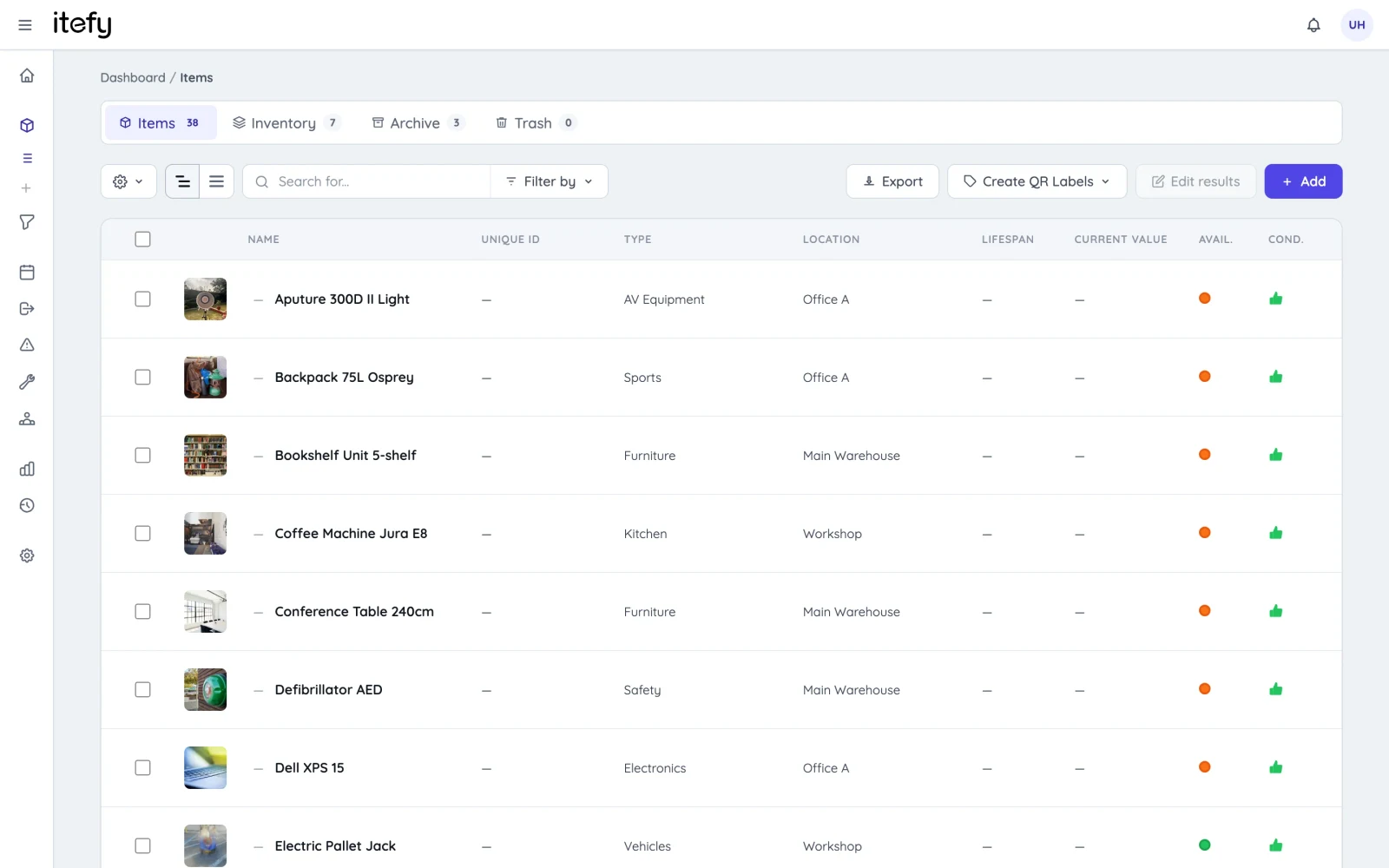
Booking and check-out are the same system. A reservation for Thursday and a check-out today both act on the same availability, so a clash is caught at the moment someone tries to book — named, with the item that is already committed — rather than discovered on the loading dock. The calendar shows what is actually committed.
Condition can block a booking. Marking an item inoperative takes it out of circulation for normal use, while still allowing it to be booked for the repair. This sounds small and is not — it is the specific failure where a known-broken item gets checked out anyway.
Kits nest, up to five levels. A lens case inside a camera kit inside a flight case, booked as one thing, at any level. We read the published documentation for ten competing products while writing our kits feature page and found none that documented a kit containing a kit. It is genuinely uncommon.
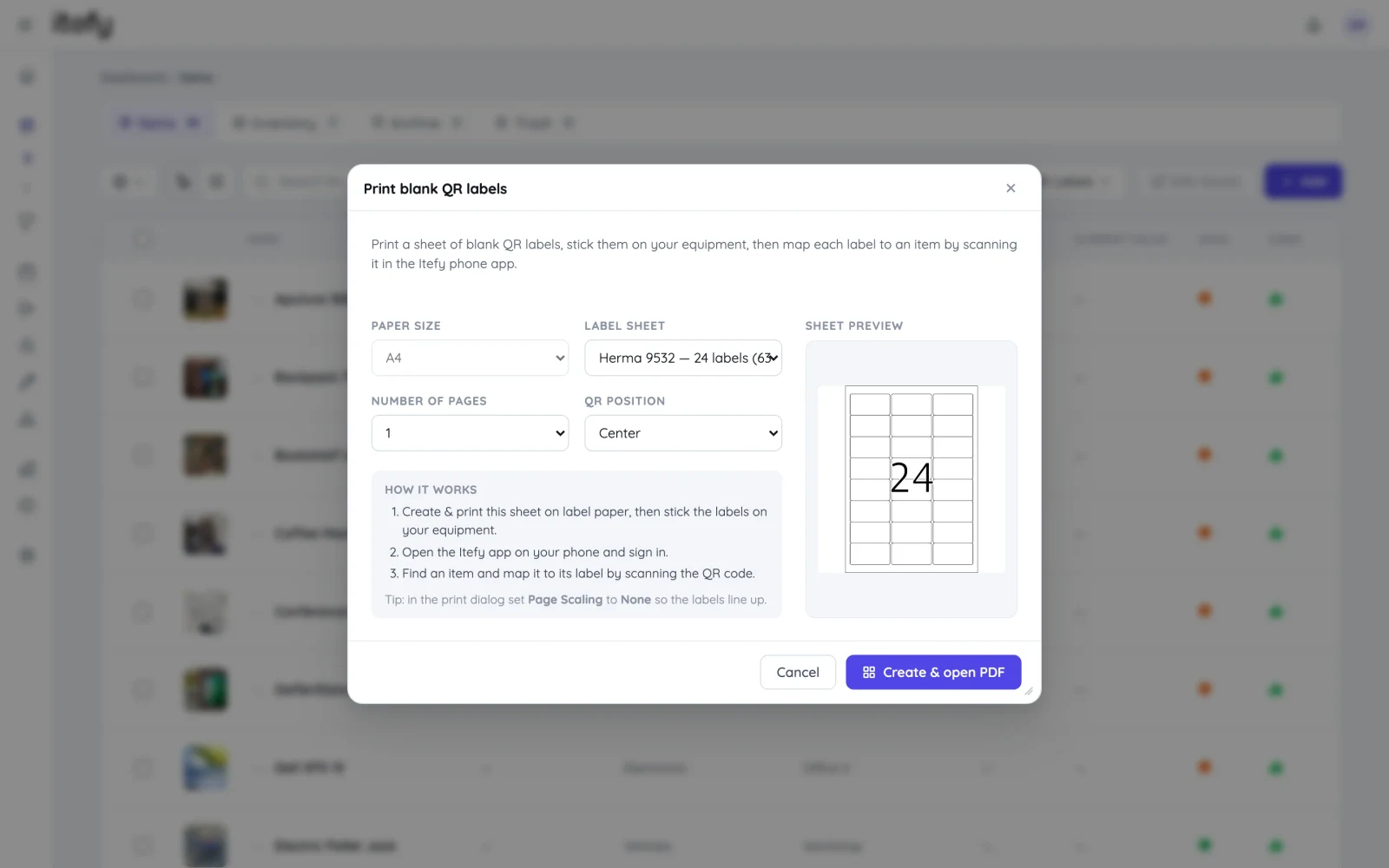
QR labels resolve to the item. Print a label, stick it on the item, and a signed-in user can scan it with a phone to check it out, report a fault or log maintenance. Scanned by someone without a login, the same label opens a read-only page for the item — useful for "what is this and who owns it", but it is not a public fault-report form, and we would rather say so than let you find out.
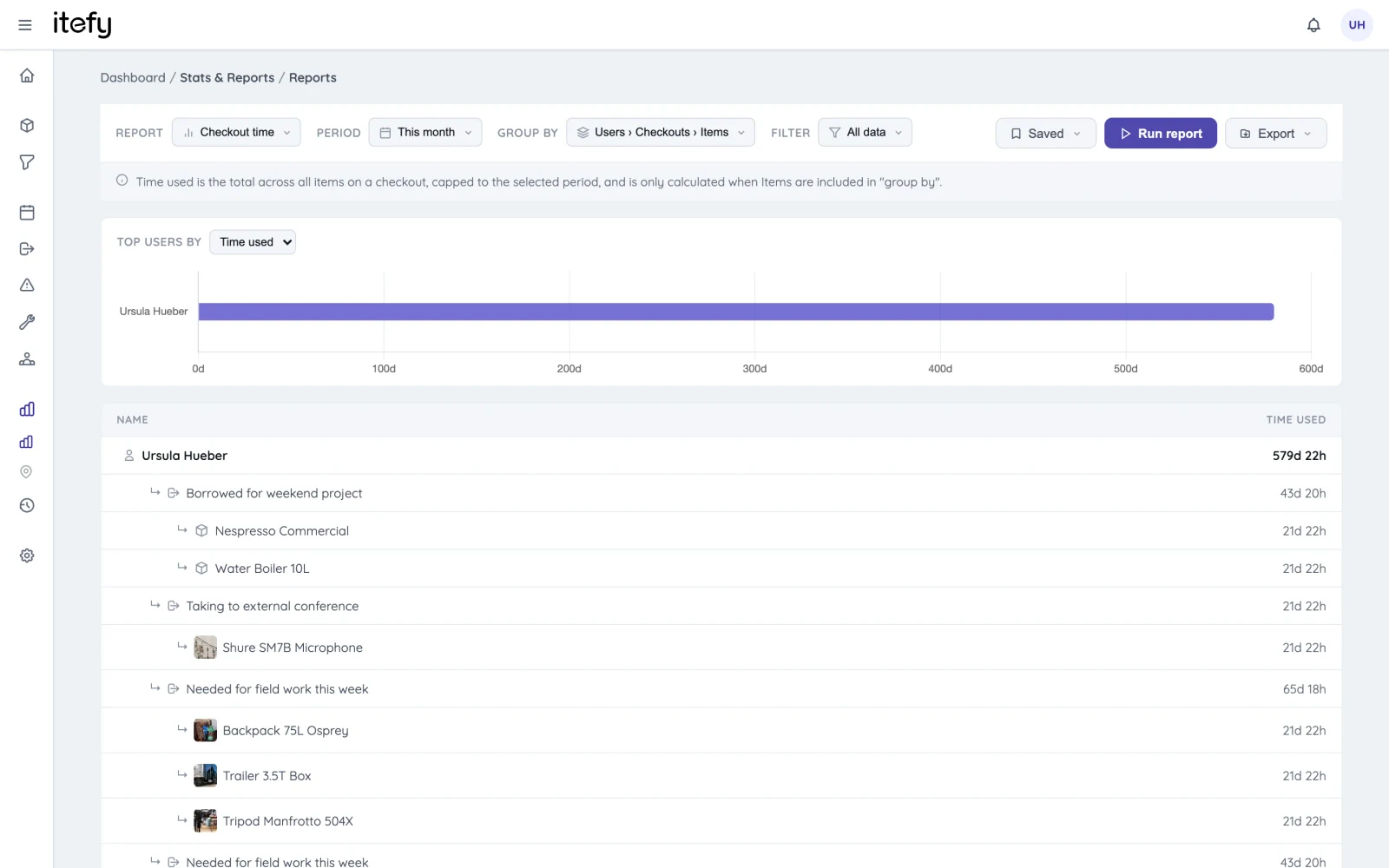
Reports on what actually happened. Utilisation, planned versus actual, maintenance cost and downtime, exportable and schedulable by email.
And the gaps, since we have been asking that of everyone else on this page. Itefy is scan-based custody tracking, not GPS telematics — it tells you who took something and when, not where it is on a map right now. There is no job costing. It does not work offline in any meaningful way. If those are your requirements, one of the tools above or a different category entirely will serve you better.
How to choose
Answer these in order and the shortlist gets very short:
- Is this IT hardware issued to staff, or shared equipment that circulates? Issued hardware → Snipe-IT or GLPI. Circulating equipment → keep reading.
- How many people need to see it? One → Shelf's free tier. Several → a free tier will not do it.
- Do you have someone to run a server? Yes → self-host and save the money. No → hosted, and accept that hosted is paid.
- Is the question "what do we own" or "where is it right now"? The first is a register. The second is a system.
- What does one lost or double-booked item cost you? If it is more than a monthly subscription, the arithmetic has already answered the question.
Most teams reading this should start with Snipe-IT or a spreadsheet, and a good number of them will never need anything else. If you get to question four and the honest answer is "where is it right now", that is the point where a 14-day trial will tell you more than another comparison table will.
Frequently Asked Questions
-
For IT hardware, Snipe-IT is the strongest genuinely free option — it is AGPL-3.0 licensed, self-hosted, and has no cap on assets or users. For a small non-IT inventory, Shelf's free Personal plan gives one user unlimited assets. For maintenance-led work, openMAINT is the established open-source CMMS. All three are free to licence but need a server you pay for and someone to maintain it.
-
No. AssetTiger's pricing page now labels that tier a "30-Day Trial" with up to 250 assets and limited access. When the 30 days end, an account that has not upgraded becomes view-only. Paid plans start at $20/month for 500 assets. Many articles still describe this tier as permanently free; it is not.
-
Not usually. Desktop Excel requires a paid Microsoft 365 licence. Excel for the web is free with a Microsoft account and is genuinely capable for a small asset register, but it has no audit trail, no check-out state and no notifications, so it stops working as a system once more than one person edits it.
-
The licence is the cheapest part. Self-hosted tools need a server, TLS certificates, backups you have tested, security patching and version upgrades, plus the person who does all of that. Budget a few dollars a month for a small VPS and, more importantly, a named person with the time to own it. If nobody owns it, the install drifts out of date and quietly becomes a liability.
-
When the equipment leaves the building and comes back, when several people need to book the same gear without colliding, when a missing item costs more than the subscription, or when nobody on the team wants to be a part-time sysadmin. Free tools are strongest as registers. Paid tools earn their money on the day-to-day movement of equipment between people.