
Equipment booking vs. checkout: what each one records, and when you need both
A booking is a promise about the future. A checkout is a record of who has something right now. They answer different questions, fail in different ways, and most teams that share equipment end up needing both. Here is how to tell which you need, and how the two should connect.
The short version
- A booking says who will have an item and when. A checkout says who has it now and when it is due back. They answer different questions.
- Checkout alone works when there is more equipment than demand. Booking alone works for things that never leave the room.
- You need both once equipment is scarce, jobs are planned ahead, or gear goes out in kits.
- A booking should not block its own pickup. The system should warn you about the reservation and let you turn it into the checkout.
- Comparing the two is how you find bookings nobody collected and gear taken without one.
In this article
- Two questions, two records
- When checkout alone is enough
- When booking alone is enough
- When you need both
- How the two should connect
- Comparing plans with what happened
- Which one to start with
Tuesday, 07:15. The drill is on the shelf with a note taped to it: Kari — Thursday. Anders needs a drill now, for two hours, and Thursday is two days away. He takes it. Thursday, Kari finds a note on an empty shelf.
Or: the drill is not on the shelf. Nobody has written anything down. It could be in a van, at a customer's site or in somebody's locker, and nobody can say which.
These are two different failures. The first is a booking that nothing enforced. The second is a checkout that was never recorded. Teams usually find out that they needed both by living through each of them.
The short version: a booking records who will have an item and when. A checkout records who has it now and when it is due back. If equipment is plentiful, checkouts alone are fine. If it never leaves the room, bookings alone are fine. For most shared equipment, especially scarce, planned or kitted gear, you need both, and they need to be in the same place so one can turn into the other.
Two questions, two records
It helps to be precise about what each one is for.
| Booking (reservation) | Checkout | |
|---|---|---|
| Answers | Who will have it, and when? | Who has it right now? |
| Created | Days or weeks in advance | The moment it leaves |
| Ends | When the planned window passes, or the item is picked up | When it comes back |
| Protects against | Two people planning on the same item | Losing track of where it went |
| Typical failure | Nobody checks it before taking the item | Nobody writes it down |
A booking is about time. Its whole job is to refuse a second promise for the same slot. A checkout is about custody, meaning where the item physically is and who is responsible for it.
Neither can stand in for the other. A calendar full of bookings cannot tell you whether the camera came back on Friday. A perfect checkout log cannot tell you that three teams are planning to use the same camera next week.
When checkout alone is enough
Some teams never need to book anything:
- There is more supply than demand. Ten drills and rarely more than four in use. The only question is where they went.
- Loans are short and unplanned. Grab a tool, use it, return it the same day. Nobody plans a Tuesday around an extension cord.
- Everything goes out from one counter. A tool crib or equipment room where someone hands items over. Whoever is at the counter already decides who gets what.
Here a booking step adds friction for nothing. People will skip it, and a booking system people skip is worse than none, because it looks trustworthy. The tool crib and who-has-what posts cover this checkout-first setup.
When booking alone is enough
The opposite case is rarer but real: equipment that is used where it stands. A lab instrument bolted to a bench, a large-format printer, a machine in the workshop. Nobody walks off with it. The only conflict is over time, so a booking is all you need.
Once an item can leave the building, though, the question "where is it?" comes back, and booking alone stops being enough.
When you need both
Most teams that share equipment end up here. The signs:
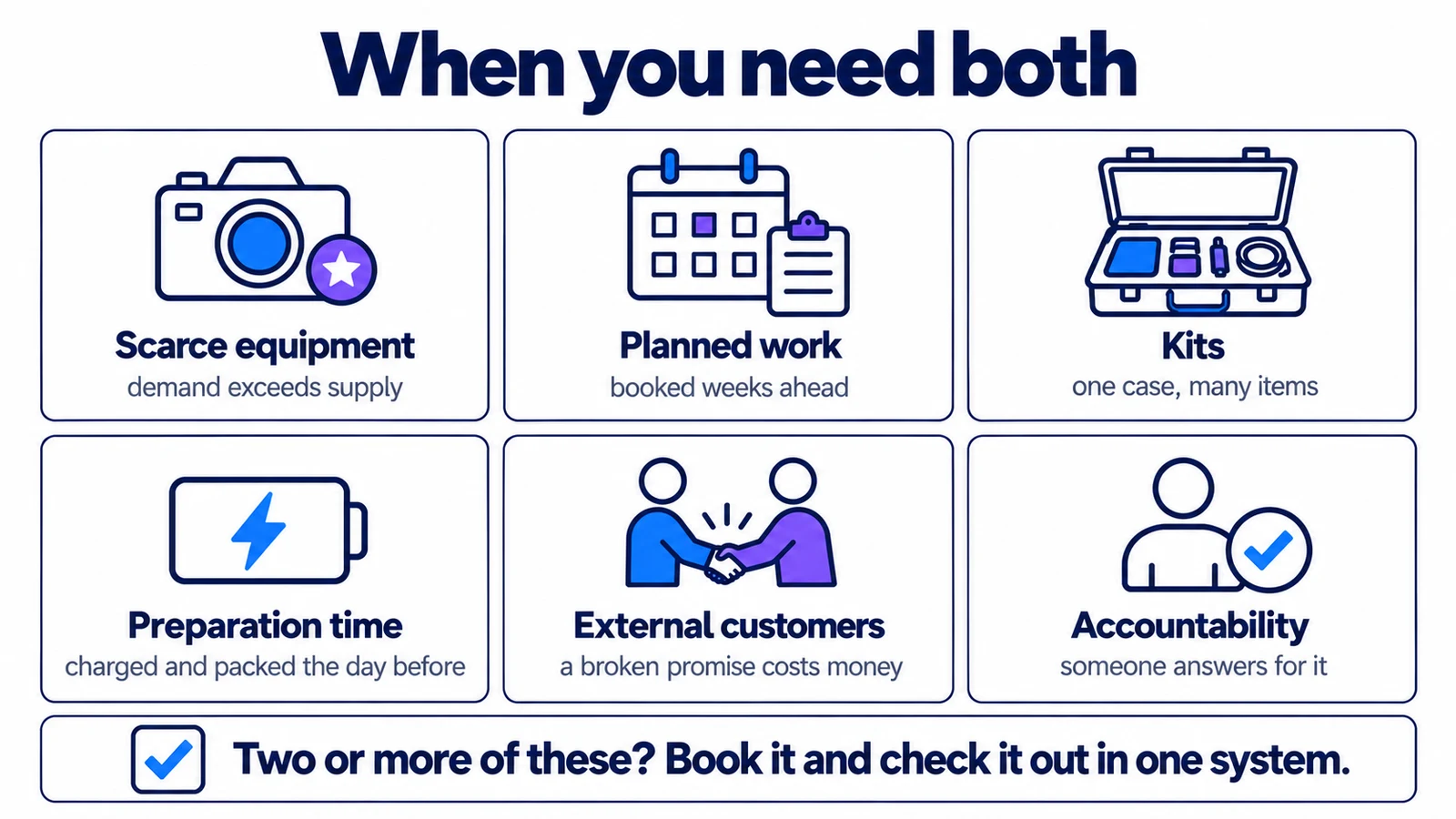
A case goes out with twelve things in it, so booking the case has to hold all twelve and checking it out has to account for all twelve. Preparation is the quiet one: batteries only get charged the day before if somebody knows the booking exists.
The next question is how the two connect, and that part is usually where things go wrong.
How the two should connect
The lifecycle you want looks like this:
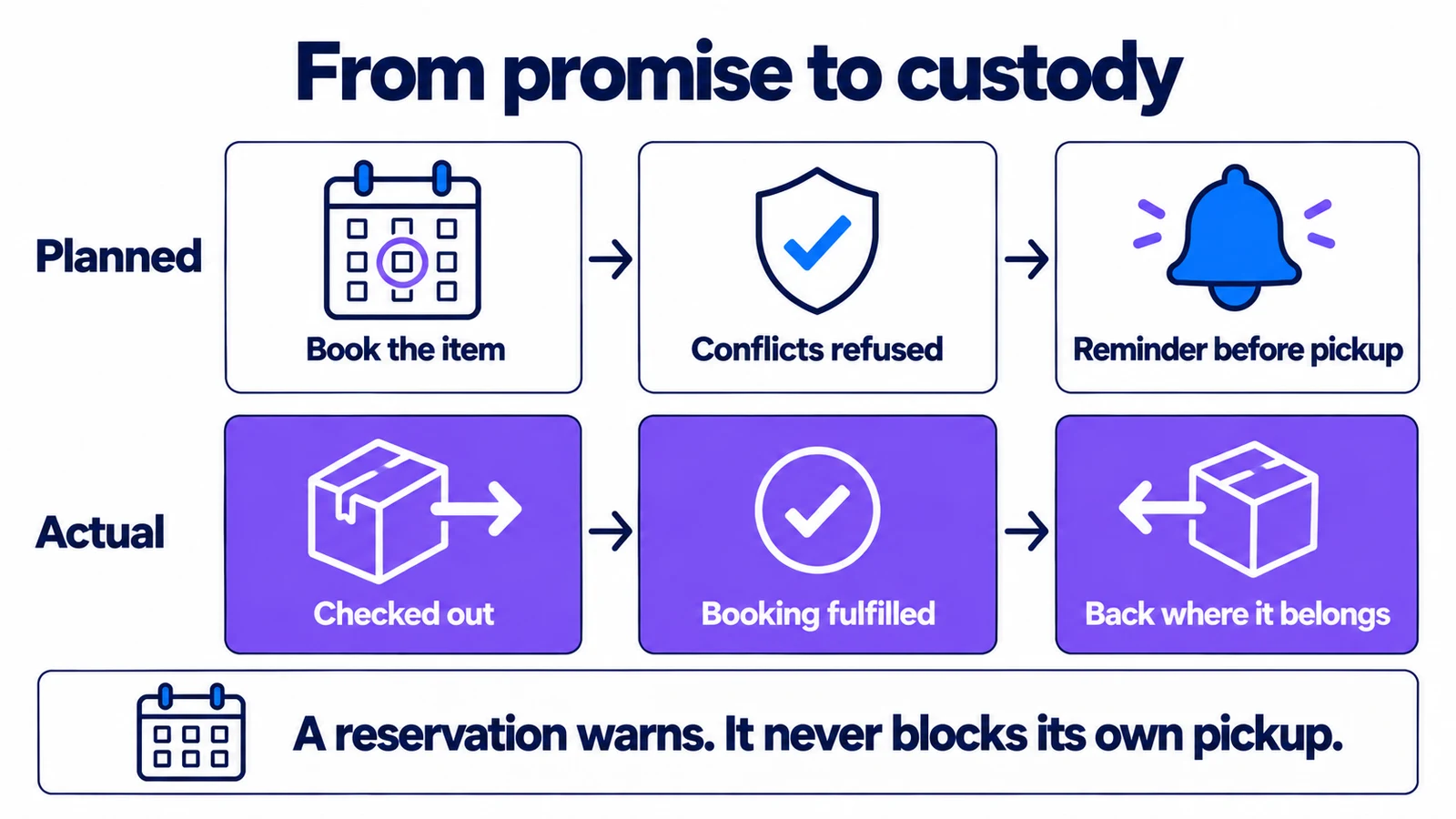
The handoff in the middle is the part that matters most, and it is easy to get wrong in two opposite ways.
Too loose: the booking lives in a shared calendar and the checkout in a spreadsheet. Nothing links them, so a booking cannot stop a checkout, and a checkout never closes a booking. We looked at why that fails in how to stop double-booking shared equipment.
Too strict: the system treats every reservation as a lock and refuses any checkout of a reserved item. It sounds safe, but it blocks the most common case of all: the person at the shelf is usually the one who made the booking, collecting it.
The right behaviour is in between: a reservation warns, it does not block. Here is what that looks like in Itefy when someone starts a checkout:
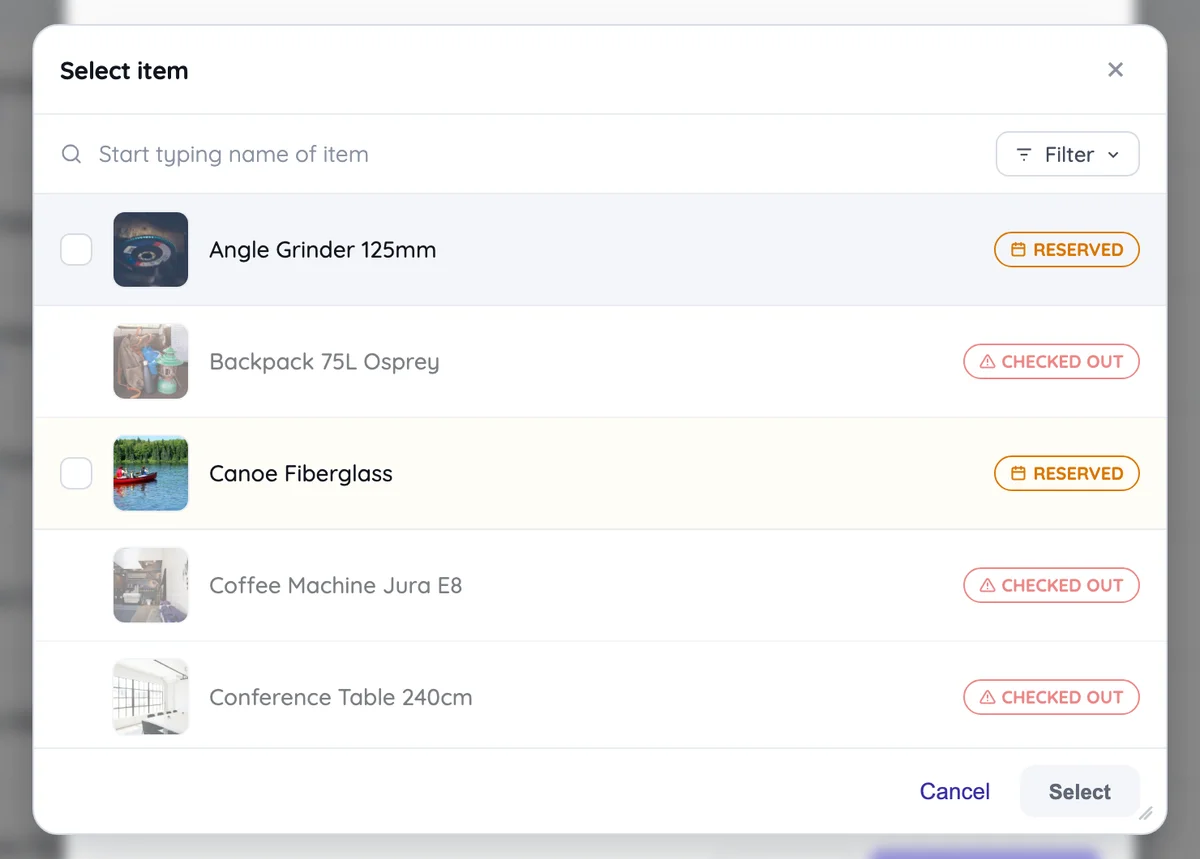
The two badges mean different things, and the difference is the whole point of this article. Checked out is custody. The item is physically gone, so you cannot pick it. Reserved is a promise. The item is on the shelf and somebody plans to use it during the period you are asking for. You can still take it, but now you know.
When you do pick reserved items, Itefy names the reservation and offers to turn it into this checkout:
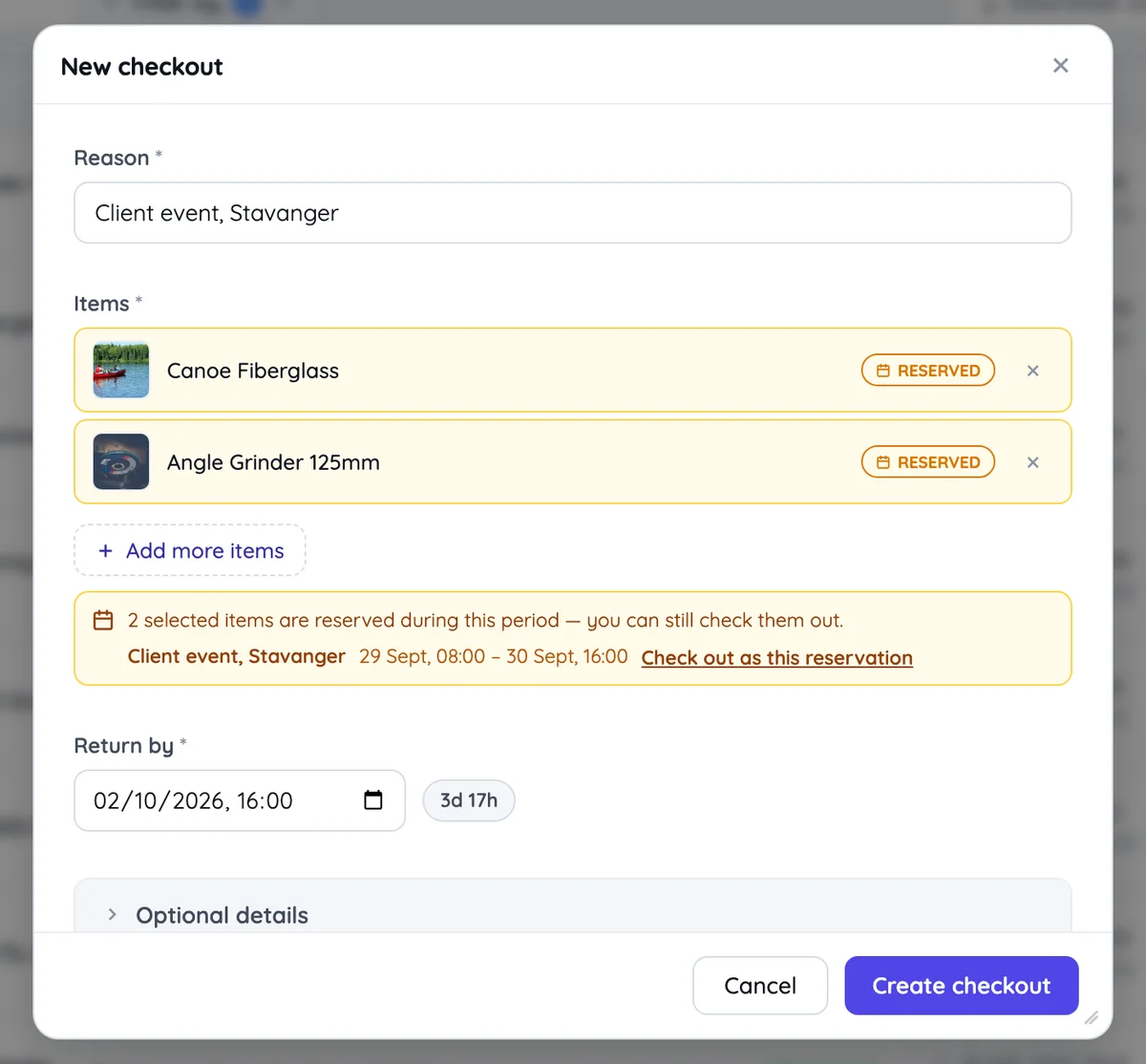
Clicking Check out as this reservation links the checkout to the booking and marks the booking fulfilled. Without that link the reservation stays open, and later it looks like a booking nobody collected. You can also go the other way and start the checkout from the reservation itself.
A few other rules only make sense once both records exist:
- Kits expand on both sides. Booking a case books everything in it. Checking it out takes everything in it.
- Broken equipment is refused by both. An item marked inoperative cannot be booked for use or checked out, but it can still be booked for its own repair.
- Each side has its own reminders. A booking reminds people six hours before it starts and flags itself an hour after it ends if nobody collected it. A checkout reminds six hours before it is due back and flags itself when it is late.
Comparing plans with what happened
Once bookings and checkouts are linked, you can compare the two, which neither record can do on its own:
- Bookings that never became checkouts. Plans that changed, or people booking "just in case", which blocks everyone else for nothing.
- Checkouts that never had a booking. Fine for short loans. On scarce equipment it means people are skipping the planning step, and that is where the next double booking comes from.
- Collected late or returned late. Pickups and returns that drift from the booked window show whether your booking lengths are realistic.
- Took something different. A booking for five items that went out as three, or as seven.
Itefy's Planned vs actual report measures all four, grouped by person, item, item type or location. It is part of the reports on the Startup plan and up. The dashboard shows two of the numbers as running totals: the share of bookings that were actually fulfilled, and how closely checkouts matched their plans.
You do not need a report to act on this, though. If people book equipment and then check out something else, the booking step is costing them time and giving you nothing back. That is worth fixing first.
Which one to start with
If you are starting from nothing, start with checkouts. Knowing who has what solves the most painful problem, and it is the habit that is hardest to add later.
Add bookings when you see the first sign of scarcity: two people wanting the same thing on the same day, or someone saying "I thought it was free". Add them in the same system, so the two can connect, rather than in a calendar next to it.
And once your team plans in bookings, put them in the calendars people already check. A booking that nobody remembers until the day is only doing half its job.
Frequently Asked Questions
-
A reservation is a promise about the future — this item is yours from Thursday to Saturday. A checkout is a record that the item physically left, who has it, and when it is due back. A reservation can exist for weeks before anything happens; a checkout starts the moment someone walks out with the item.
-
Not always. If you have more equipment than people who want it, checkout alone is usually enough. If an item never leaves its room, booking alone is enough. Once equipment is scarce, jobs are planned in advance, or items go out as kits, you need both, and they need to live in the same system.
-
It should warn, not block. Very often the person at the shelf is the one who made the reservation and is collecting it. Blocking would stop the most common case. A good system shows the reservation and offers to turn it into the checkout.
-
Compare what was booked with what was checked out. Bookings that never became a checkout point to hoarding or cancelled plans, and checkouts with no booking show where people skip the planning step. Itefy's Planned vs actual report does this comparison.