
Install Itefy Go
Itefy Go is a web app. There is nothing in the App Store or on Google Play — you open it in your phone's browser and, if you want, add it to your home screen.
Use it without installing
Open go.itefy.com in your phone's browser and sign in. That is the whole thing. Everything works.
Bookmark it if you like. Signing in lasts, so you will not be asked again every time.
Add it to the home screen
Installing gives you an icon like any other app, no browser chrome, and — the part that matters — push notifications.
iPhone and iPad (Safari)
- Open go.itefy.com in Safari. This does not work from Chrome on iOS.
- Tap the Share button.
- Scroll down and tap Add to Home Screen.
Android (Chrome)
- Open go.itefy.com in Chrome.
- Tap the ⋮ menu.
- Tap Install app (sometimes Add to Home screen).
Itefy Go also offers to install itself: on Home, and under More → your name → Install Itefy Go.
Updating
The app updates itself. When a new version is ready, a small banner appears with a Reload button.
Sometimes that is not enough, and the app keeps showing you the old version. This is most common on iPhone and iPad, where an installed app is suspended rather than closed — so it never notices that a new version has arrived, however long you leave it. Switching away from the app does not close it.
When that happens, close it completely and open it again.
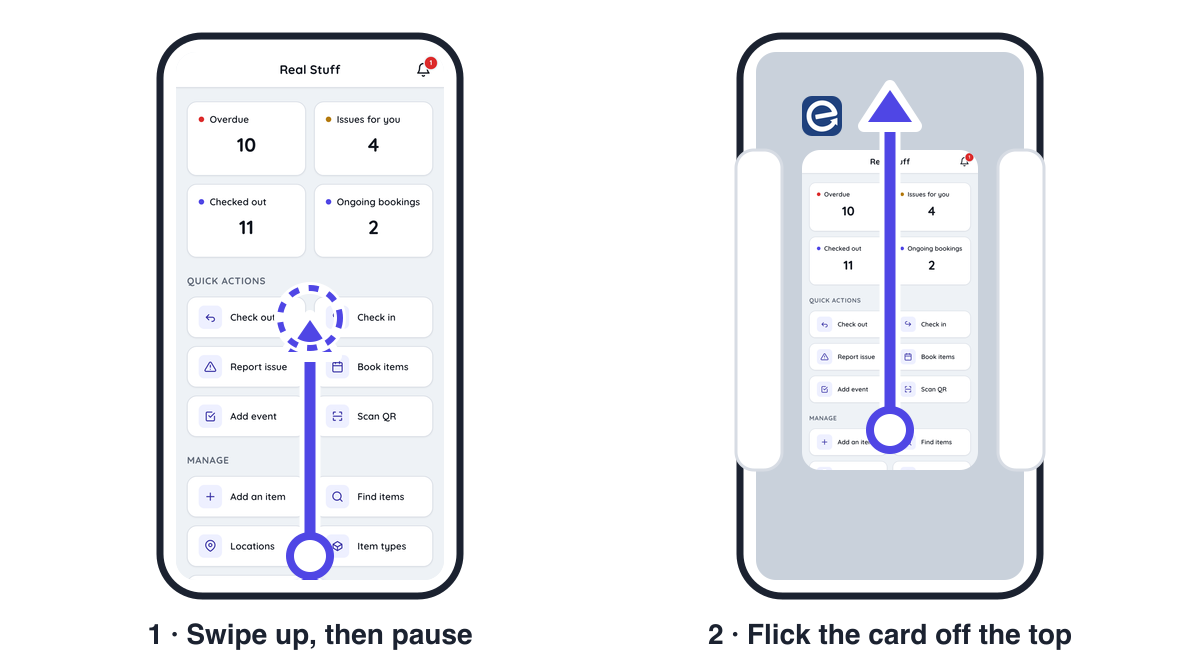
If Itefy Go is on your home screen
- Swipe up from the very bottom edge of the screen and pause in the middle. On an iPhone with a Home button, double-click the Home button instead.
- Find the Itefy Go card and flick it up and off the top of the screen.
- Open Itefy Go again from your home screen.
If you use it in a browser
- Close the go.itefy.com tab — every one of them. A forgotten tab in the background keeps the old version alive.
- Open go.itefy.com again.
Still on the old version? Do it once more. It sometimes takes two rounds: the first launch collects the new version, the second one runs it.